Forum Discussion

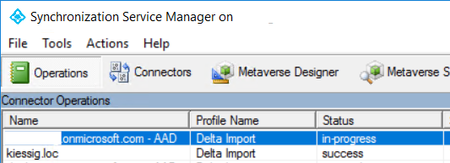
AD Connect hang by delta Import
 Dec 12, 2018
This Powershell commands solved my problem
Set-ADSyncScheduler -SyncCycleEnabled $FALSE
Start-ADSyncSyncCycle -PolicyType Initial
Start-ADSyncSyncCycle -PolicyType Delta
Set-ADSyncScheduler -SyncCycleEnabled $TRUE

This could be an network issue as well!
What happens if you initiate a delta or full sync via powershell?
start-adsyncsynccycle -policytype delta/initial
I’ve heard other with this problem and got it resolved by changing the syncing service account as well
Full sync starts via PowerShell or with ad connects runs without any problems. Only the delta Import brings the problems
I find three log entries:
Failure while prefetching import data. More details at: https://go.microsoft.com/fwlink/?linkid=869679. Exception message: Failed even after 5 retries. Action: ImportV1, Network error occurrences = 0. Exception: The Windows Azure Active Directory service is temporarily unavailable. If you continue to see this issue, contact Technical Support.
Failure while importing entries from Windows Azure Active Directory. More details at: https://go.microsoft.com/fwlink/?linkid=869679. Exception message: Failed even after 5 retries. Action: ImportV1, Network error occurrences = 0. Exception: The Windows Azure Active Directory service is temporarily unavailable. If you continue to see this issue, contact Technical Support.
The management agent "dev.onmicrosoft.com - AAD" failed on run profile "Delta Import" because the server encountered errors.
- VasilMichevDec 10, 2018MVP
That does look like a connectivity issue, have you checked the steps in the article they are referencing? https://docs.microsoft.com/en-us/azure/active-directory/hybrid/tshoot-connect-connectivity
- StefanKiDec 12, 2018Iron Contributor
This Powershell commands solved my problem
Set-ADSyncScheduler -SyncCycleEnabled $FALSE
Start-ADSyncSyncCycle -PolicyType Initial
Start-ADSyncSyncCycle -PolicyType Delta
Set-ADSyncScheduler -SyncCycleEnabled $TRUE
- VasilMichevDec 12, 2018MVP
Interesting, so it simply needed a full sync. Cant say I've seen such behavior previously...
- StefanKiDec 11, 2018Iron Contributor
Yes I had checkt it.
Why is the network problem only in this one step and all other steps works fine.
