Forum Discussion

Disabling Agent Creation for End Users with Copilot for Microsoft 365
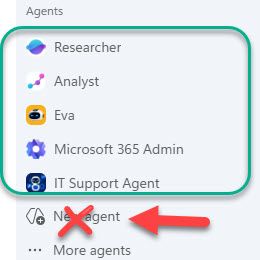

Disabling the Copilot Studio license removes the full maker experience, but Agent Builder is governed separately; therefore New Agent remains visible. In the Microsoft 365 admin center, open Copilot, Settings, Data access, Agents, then scope Agent Builder or Create an agent to an approved builders group. Keep Microsoft and organization-published agents deployed to broader groups through All agents or Integrated apps. Do not set general agent User access to No users, because that also prevents those users from interacting with approved agents. After propagation, sign a test user out and in, then confirm approved agents open while creation is absent. If your tenant exposes only a combined agent-access control and no separate builder scope, the requested split is not currently available in that rollout; open a Microsoft 365 support request rather than relying on license removal.

Hi, I don't believe there has been any resolution to this issue. Is it possible to have an update as, at the moment, we are unable to proceed with testing the 'Study and Learn' agent with real students as we do not want them to have the ability to create their own agents using Copilot Chat (see image below) using their school Microsoft account?