Forum Discussion

Max_von_Armansperg
Jan 07, 2022Copper Contributor
Insert Stream (SharePoint) Link in PowerPoint
Good Morning everyone, and a Happy New Year, first of all! We have recently started using MS Teams for Webinars we conduct with external customers. As we are using PowerPoint Live for sharin...
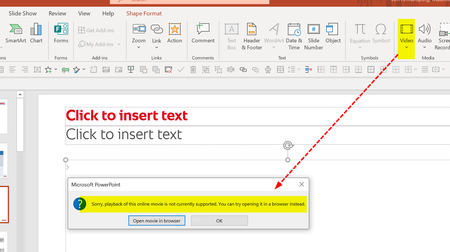

charleneevans
Nov 29, 2023Copper Contributor
Yes! I could embed from Stream before but not now! I thought all these O365 tools were supposed to work seamlessly together??!!

karen_dredske
Nov 29, 2023Iron Contributor
charleneevans here is the information from the Stream product team on embedding in PowerPoint.
"As of August 23, 2023, abilty to embed a ODB or SPO video into a PowerPoint slide is possible through PowerPoint on Web. If you insert with PowerPoint on web it'll play in all PowerPoint clients. Ability to insert ODB or SPO videos into PowerPoint on Windows and Mac is deploying. You'll need these versions...
Windows: version >= 16.0.16731.20000
Mac: version > = 16.76.804.0"
"As of August 23, 2023, abilty to embed a ODB or SPO video into a PowerPoint slide is possible through PowerPoint on Web. If you insert with PowerPoint on web it'll play in all PowerPoint clients. Ability to insert ODB or SPO videos into PowerPoint on Windows and Mac is deploying. You'll need these versions...
Windows: version >= 16.0.16731.20000
Mac: version > = 16.76.804.0"
- charleneevansNov 29, 2023Copper Contributor
Yews I found that when I googled as well. does not solve my problem.
- karen_dredskeNov 29, 2023Iron Contributor
Are you using PowerPoint online or are you trying to add the video from the client application of PowerPoint on your computer?
If you are on your computer and you save your file up to your OneDrive account and then you open it from OneDrive instead of locally on your computer, then you should get these options just like I do.
- charleneevansNov 29, 2023Copper ContributorI want to use the desktop version but thanks for the online version tip!