Forum Discussion

Valid Comparison Operators for -RecipientFilter parameter while creating DDL in Exchange Online
Hi
I'm working to build Dynamic Distribution Groups in Exchange Online that require filtering the recipients based on custom attributes and values of those attributes are in the format <something Department1>, <somethingelse Department1>, <something Department2>, <somethingelse Department2> and so on.
Read here that Exchange Online doesn't allow a wildcard prefix to filter recipients--> https://learn.microsoft.com/en-us/powershell/module/exchange/new-dynamicdistributiongroup?view=exchange-ps#-recipientfilter
The relevant section in the above article cross-references this article--> https://learn.microsoft.com/en-us/powershell/module/microsoft.powershell.core/about/about_comparison_operators?view=powershell-7.3
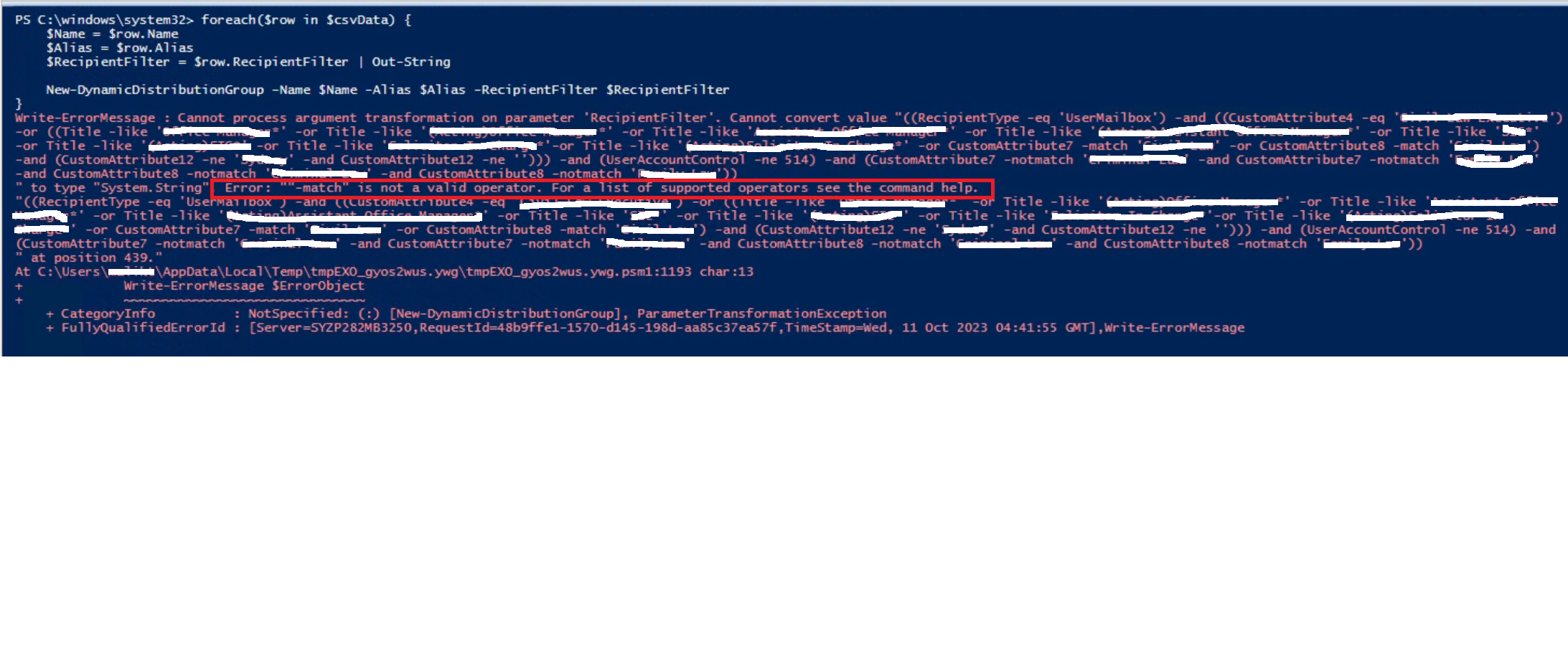
which states that we can use -match and -notmatch string comparison operators, but when trying to use those operators to create DDL, it shows the following error suggesting these are not valid operators:
Can someone please help suggest a way to filter recipients when they have a common string as prefix? I see this as a very common requirement and sure someone out there has figured out a solution.
Thanks
Taranjeet Singh
3 Replies
- Andres-BohrenSteel ContributorDid you try -like or -notlike as comparsion operators?
 TaranjeetSM11Tin ContributorYes, but they do not allow a wildcard character as a prefix. For example, I can't specify a value such as "*Depatrment1" to -like. That's not allowed by Exchange Online.
- Only property values allow for use of wildcards, not the property names themselves. And you cannot use -match, as regex is not supported.