Forum Discussion

SMTP Delivery to Mailbox fails
 Dec 13, 2024
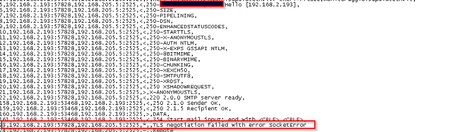
Solved , apparently, checking the TLS configuration on 2013 and configuring the "client" portion which wasn't configured via registry

Run the Exchange Health Checker script across your 2013 server (and worth running on your 2019 server as well just to make sure). It should advise you what you need to do. Most likely this is a TLS misconfiguration (You should disable TLS 1.1 to increase security)
 oyimafuEmmaDec 19, 2024MCT
we are having issue with our on-prem exchange server 2019.
if a user whose mailbox is on-prem try to send email to organization exchange online mailbox the mail get delivered for some user and not delivered for others with this error on the queue viewer
LastError : LED=451 4.4.397 Error communicating with target host. 421 4.2.1 Unable to connect SocketTimedout: Socket error code 10060};{MSG=};{FQDN=};{IP=192.168.100.4 LRT=12/19/2024
10:30:44 AM
i have confirmed the MX record properly configured.
The send connector was configured to route mail using smart host
please what should i check.- StefanoC66Dec 13, 2024Iron Contributor
Hello Dan_Snape
I already ran the healthchecker on both and as per the TLS it was enabled TLS1.0,1.1,1.2 on Exchange 2013 and only TLS1.2 on 2019.
I enable TLS1.0 and 1.1, just to have a try, on 2019 but didin't solve.