Forum Discussion

retention tag won't delete emails from deleted items
 Dec 21, 2020
@ found the problem.
User deleted his emails. When emails were moved to Deleted Items, they were tagged on that date. So original date of email received was ignored.
https://docs.microsoft.com/en-us/exchange/security-and-compliance/messaging-records-management/retention-age#determining-the-age-of-different-types-of-items
In the Deleted Items folder
Date of delivery or creation unless the item was deleted from a folder that does not have an inherited or implicit retention tag.
If an item is in a folder that doesn't have an inherited or implicit retention tag applied, the item isn't processed by the The Managed Folder Assistant (MFA) and therefore doesn't have a start date stamped by it. When the user deletes such an item, and the MFA processes it for the first time in the Deleted Items folder, it stamps the current date as the start date.
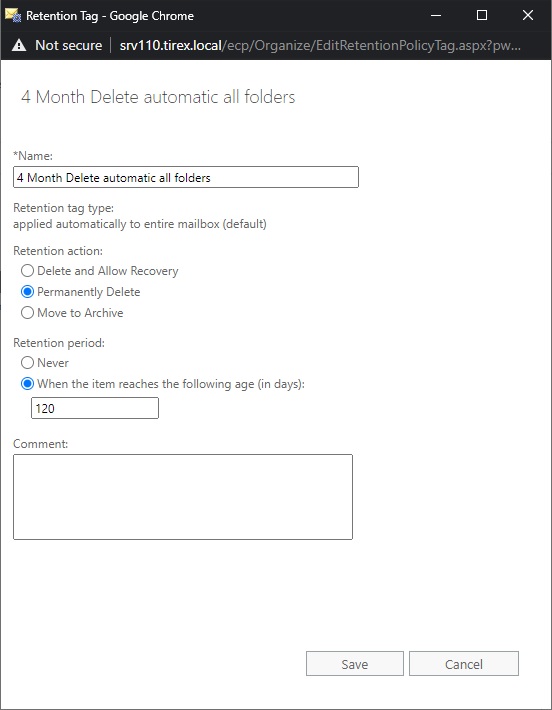
thank you for your reply. I also had another retention tag, which target Deleted items. Still not deleting older emails 😞 See attached picture.


Ondrej Balaz Hi, have to agree with the previous reply. I also believe you're using a Default policy tag (DPT) but should be using Retention policy tags (RPTs).
https://docs.microsoft.com/en-us/exchange/security-and-compliance/messaging-records-management/retention-tags-and-policies#retention-policies
- Ondrej BalazNov 09, 2020Brass Contributor
In exchange ECP I have 3 options:
applied automatically to entire mailbox (default)
applied automatically to a default folder
applied by users to items and folders (personal)
My first screenshot is option 1, my second is option 2. Neither of this work on deleted items. I was reading a documentation https://docs.microsoft.com/en-us/exchange/policy-and-compliance/mrm/create-retention-policies?view=exchserver-2016 and I think, that number 2 is RPT:
Applied automatically to a default folder: Creates a retention policy tag (RPT) for a default folder such as Inbox or Deleted Items.
- ChristianBergstromNov 09, 2020Silver Contributor”To apply one or more retention tags (DPT/RPT) to a mailbox, you must add them to a retention policy and then apply the policy to the mailbox”. Completed? Look for the MS docs section starting with ”A retention policy can have the following retention tags” for the summary and there you’ll see the ”Retention tag type” and the ”Tags in a policy”.
If you need more assistance maybe open up a ticket with the official support instead?- Ondrej BalazNov 09, 2020Brass Contributor
ChristianBergstrom T Yes, I have a retention policy, where is this retention tag assigned to the mailbox. But deleted items folders refuse to accept it 😞
We don't have a support for this product from Microsoft. But I appreciate your help, thank you.
Best regards.