Forum Discussion

Weird behavior of Exchange Online for none-existing email address
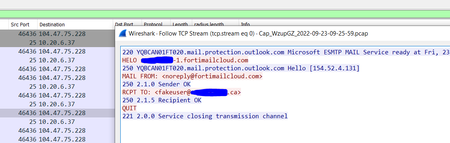
- Sep 28, 2022Jack_Chen1780 - This behavior is expected. The DBEB functionality can reject on either RCPT TO or on "End Of Data". The latter happens when the sending IP is shared between multiple tenants, and in order for EOP to correctly attribute to the recipient tenant, we need to traverse the headers which are available only after EoD.

 Microsoft
EOP should allow any sending IP send emails to any tenants. I don't think you have a way to identify a sending IP belong to a particular tenant.
For example, I have a Azure VM with public IP 20.48.254.109. when I use it to connect to EOP Canada VIP 104.47.75.164 :
telnet 104.47.75.164 25
Trying 104.47.75.164...
Connected to 104.47.75.164.
Escape character is '^]'.
220 YT3CAN01FT005.mail.protection.outlook.com Microsoft ESMTP MAIL Service ready at Thu, 29 Sep 2022 13:29:17 +0000
helo test.com
250 YT3CAN01FT005.mail.protection.outlook.com Hello [20.48.254.109]
mail from:email address removed for privacy reasons
250 2.1.0 Sender OK
rcpt to:email address removed for privacy reasons
550 5.4.1 Recipient address rejected: Access denied. AS(201806281) [YT3CAN01FT005.eop-CAN01.prod.protection.outlook.com]
rcpt to:email address removed for privacy reasons
250 2.1.5 Recipient OK
quit
telnet 104.47.75.164 25
Trying 104.47.75.164...
Connected to 104.47.75.164.
Escape character is '^]'.
220 YT3CAN01FT013.mail.protection.outlook.com Microsoft ESMTP MAIL Service ready at Thu, 29 Sep 2022 13:30:57 +0000
helo test.com
250 YT3CAN01FT013.mail.protection.outlook.com Hello [20.48.254.109]
mail from:email address removed for privacy reasons
250 2.1.0 Sender OK
rcpt to:email address removed for privacy reasons
550 5.4.1 Recipient address rejected: Access denied. AS(201806281) [YT3CAN01FT013.eop-CAN01.prod.protection.outlook.com]
rcpt to:email address removed for privacy reasons
250 2.1.5 Recipient OK
quit
221 2.0.0 Service closing transmission channel
I don't believe EOP has any way to identify 20.48.254.109 belong to a tenant; when it is connected to EOP, before the "RCPT TO", there isn't any data indicating which EOP tenant it want to send email. Yet EOP can still correctly response with 500 or 250 for multiple tenants.
The problem is when I do exact same test from Fortimail Cloud 154.52.4.131 , EOP only response with 250.
EOP Canada is treating sending IP 154.52.4.131 and 20.48.254.109 differently.
- Arindam_ThokderSep 29, 2022
Jack_Chen1780 - Dev tenants were used to relay phish emails through EXO using Inbound connector. Because of this misuse, we had to other way but to restrict that.
- Jack_Chen1780Sep 29, 2022Brass Contributor
BTW, EOP doesn't allow Dev tenants to setup incoming connector now: https://techcommunity.microsoft.com/t5/exchange/exchange-online-connector-creation-failed/m-p/3624401
Can someone reason with Microsoft we need to test stuff in dev tenant 😞 - Jack_Chen1780Sep 29, 2022Brass Contributor
Thanks Arindam_Thokder and VasilMichev . With your help, I was able to verify EOP's behavior and find a solution.
The blog link send by Arindam provided the information I need.
I have confirmed EOP will behave this way:
1. if the sender IP is not included in any tenant's incoming connector, the message is considered as Incoming, and "RCPT TO" will work as expected for any receipt email address.
2. If the sender IP is include in one or more tenant's incoming connector, the message is considered as Originating and things are getting more interesting.
For originating message, if the "mail from" and "rcpt to" email address match one of the setup incoming connector, then "rcpt to" will work as expected. If either of the "mail from" or "rcpt to" doesn't match the tenant's email, "rcpt to" will always return 250.
So to fix the problem, I will need to create a incoming connector in my tenant with the IP from Fortimail, then change Fortimail 's "Recipient address verification" from "use system setting" to "use domain setting".
So
mail from:noreply @ my email domain .com
rcpt to:my email domain .com
will work as expected ( return 550).
mail from: noreply @ Fortinet .com
rcpt to:my email domain .com
won't work. - Arindam_ThokderSep 29, 2022Jack_Chen1780- Sure, while creating connector, make sure it's of type "Onpremises" and not "Partner".
- Jack_Chen1780Sep 29, 2022Brass ContributorThanks for the detailed explanation Arindam! That make much better sense now. I will try to setup inbound connector for 20.48.254.109 , see if I can reproduce the problem.
If this is the issue, I can check with Fortinet if they can provide us a dedicated outbound IP. Currently this configuration will cause we exceed Fortimail user license and although they haven't restricted it yet, Fortmail support mentioned they will restrict it in future release, so we need to figure out a way to make sure it's working. - Arindam_ThokderSep 29, 2022Jack_Chen1780- I think you got confused by the line "The Fortimail IP address must be shared between many tenants and not a dedicated for you". Let me try to explain - Some IP Addresses of servers/devices are shared and used to send to multiple tenant (and by this line, I am not trying to say that the IP belongs to a particular tenant). Some tenant can create an inbound connector (of type on-premises or partner) to accept email from that IP, sometime multiple tenants can create Inbound connector from same IP Address as the sending IP is shared and that can cause issue with attribution. It's not as simple as just RCPT TO. I suggest you read the techcommunity blog to know about that- https://techcommunity.microsoft.com/t5/exchange-team-blog/office-365-message-attribution/ba-p/749143
You mentioned "when it is connected to EOP, before the "RCPT TO", there isn't any data indicating which EOP tenant it wants to send email." - This is not correct. The connecting f IP Address can be mapped to a tenant based on Inbound connector created. You have an Azure VM with public IP 20.48.254.109, and most probably no one has any Inbound connector created to accept email from that IP Address, that's why there is no confusion. But if the IP address is widely used, then it's not that simple. Thats why we need to wait till EOD and see all the headers to make sure we are rejecting an Invalid address properly.