Forum Discussion

Problem Search in mailboxes exchange 2019
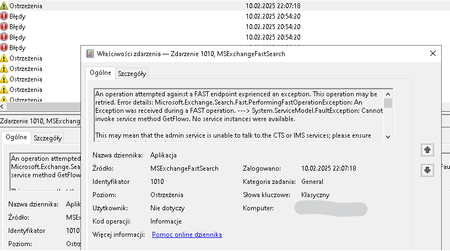

Hello, daweagle
Please Review Rebuild Search Index.
If search issues persist, consider rebuilding the search index for the affected mailbox database
Step By Step
1. Stop the 'Microsoft Exchange Search' and 'Microsoft Exchange Search Host Controller' services.
2. Navigate to the following directory.
"C:\Program Files\Microsoft\Exchange Server\V15\Bin\Search\Ceres\HostController\Data\Nodes\Fsis"
[CAUTION] Delete all files and subfolders within that folder, but do not delete the "Fsis" folder itself.
3.Open Exchange PowerShell
cd 'C:\Program Files\Microsoft\Exchange Server\V15\Bin\Search\Ceres\Installer'
.\installconfig.ps1 -action i -datafolder "C:\Program Files\Microsoft\Exchange Server\V15\Bin\Search\Ceres\HostController\Data"
4. Start the 'Microsoft Exchange Search' and 'Microsoft Exchange Search Host Controller' services.
 daweagleFeb 14, 2025Brass Contributor
thanks for the answers, I also found a solution (
Resolve Big Funnel Indexing Issues - https://learn.microsoft.com/en-us/answers/questions/1159947/unhealthy-indexes)
- whether to use yours and then the second one or not the second one at all ?
- daweagleFeb 15, 2025Brass Contributor
Resolved only back search at day but second Big funnel unchaltly indexes https://support.microsoft.com/en-us/topic/incomplete-search-results-after-installing-an-exchange-server-2019-update-96ae2ef0-4569-4327-8d0c-8a3c1abdc1f6 and back all thanks for answers AnnTaeYoun TEA_YOUN_ANN
- AnnTaeYounFeb 14, 2025MVP
I hope it gets resolved.