Forum Discussion

OWA “Manage Add-ins” Stuck Loading After Clicking Settings (Exchange 2019 CU15 / Exchange SE RTM)
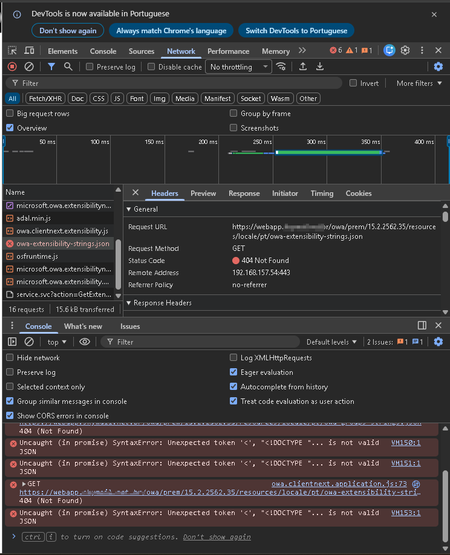

evandromalmsteen I just tested this with SE RTM and could repro the 404's you're seeing, but the Manage add-in blade appeared as expected without errors. This might be worth a call to Microsoft Support to debug this further.
 evandromalmsteenFeb 06, 2026Brass Contributor
I understand. I'll see what I can do about this with Microsoft Support.
If there are any updates, I'll post here again with how it turned out it the end.Thank you for the response.
 sandiven1154Feb 10, 2026Copper Contributor
Did you get a response,getting same issue.
I have exchange server 2016 cu 23 and two Exchange Server 2019 CU15 Oct25SU and on the exchange 2016 DB no issues but as soon as I migrate to exchange 2019 DB ,the add-ins keep loading.
On outlook client it works perfectly
- evandromalmsteenFeb 11, 2026Brass Contributor
I forced OWA/EWS to use the corporate proxy via system.net/defaultProxy because, in CU15/SE, the IIS/.NET HTTP/HTTPS calls were not honoring WinHTTP/InternetWebProxy. In a network with outbound traffic blocked, that was causing failures.
The bypasslist was adjusted to use valid regex patterns so we wouldn’t break OWA, keeping only internal exceptions.
I solved the problem doing those configurations:# 1) Check current settings (on the current server)
Get-ExchangeServer $env:COMPUTERNAME | fl Name,InternetWebProxy,InternetWebProxyBypassList
# 2) Configure the proxy on Exchange (recommended)
Set-ExchangeServer $env:COMPUTERNAME -InternetWebProxy http://proxy.email.domainlocal.prv:3128
# 3) (Optional | I didn’t use it; it’s not necessary) Set the bypass list ONLY with valid FQDNs (no IP/localhost/[::1]/wildcards)
# Example: keep the server itself out of the proxy
Set-ExchangeServer $env:COMPUTERNAME -InternetWebProxyBypassList @("SRVMBX01.domainlocal.br")
# 4) Validate again
Get-ExchangeServer $env:COMPUTERNAME | fl Name,InternetWebProxy,InternetWebProxyBypassList
# 5) Apply to ALL Exchange servers (to avoid intermittent behavior behind the load balancer)
$proxy = http://proxy.email.domainlocal.prv:3128
Get-ExchangeServer | ForEach-Object {
if ($null -eq $_.InternetWebProxy -or [string]::IsNullOrWhiteSpace([string]$_.InternetWebProxy)) {
Write-Host "Setting proxy on: $($_.Name)" -ForegroundColor Cyan
Set-ExchangeServer $_.Name -InternetWebProxy $proxy
}
}
# 6) List any servers still missing a proxy (verification)
Get-ExchangeServer | Select Name,InternetWebProxy | Sort Name
# 7) Restart IIS on the server (run on each node serving OWA/ECP)
iisreset /restart
# 8) Rollback
#Set-ExchangeServer $env:COMPUTERNAME -InternetWebProxy $null -InternetWebProxyBypassList $null
#9 Set the proxyaddress
C:\Program Files\Microsoft\Exchange Server\V15\ClientAccess\Owa
<defaultProxy>
<proxy proxyaddress=http://proxy.email.domainlocal.prv:3128 bypassonlocal="true" />
<bypasslist>
<add address="<local>" />
<add address="(^|\.)domainlocal\.net\.br$" />
<add address="^localhost$" />
<add address="^127\.0\.0\.1$" />
<add address="^\[::1\]$" />
</bypasslist>
</defaultProxy>
Or
<system.net>
<defaultProxy>
<proxy proxyaddress=http://proxy.email.domainlocal.prv:3128 bypassonlocal="true" />
<bypasslist>
<add address="<local>" />
<add address="(^|\.)domainlocal\.net\.br$" />
<add address="^localhost$" />
<add address="^127\.0\.0\.1$" />
<add address="^\[::1\]$" />
</bypasslist>
</defaultProxy>
</system.net>
<system.webServer>
<!-- allows the server to data stream immediately from client-->
# Recicle o AppPool do OWA
Import-Module WebAdministration
Restart-WebAppPool MSExchangeOwaAppPool---
It's working so far, no problem yet. Microsoft Professional Support has fallen behind so far; I’m ahead of them.
But, I have questions about EWS?There is no proxy setting (or at least I couldn’t find one) in the files under the two EWS directories below. Can you confirm whether a proxy also needs to be configured somewhere else, and if so, where and what the correct syntax is?
Also, for the directories below, I didn’t see any proxy configuration either:
• C:\Program Files\Microsoft\Exchange Server\V15\ClientAccess\exchweb\ews
• C:\Program Files\Microsoft\Exchange Server\V15\ClientAccess\Sync
• C:\Program Files\Microsoft\Exchange Server\V15\FrontEnd\HttpProxy\ews
• C:\Program Files\Microsoft\Exchange Server\V15\FrontEnd\HttpProxy\owa
• C:\Program Files\Microsoft\Exchange Server\V15\FrontEnd\HttpProxy\sync
AND
These values to <bypasslist>is the right way? I'm using it.
<add address="<local>" />
<add address="(^|\.)domainlocal\.net\.br$" />
<add address="^localhost$" />
<add address="^127\.0\.0\.1$" />
<add address="^\[::1\]$" />
Other values occur this error:
X-ClientId: 150811E942E94E01A485410A98FFA61E
request-id 5a872104-4641-424b-98f6-9b6e016cf47f
X-OWA-Error System.Configuration.ConfigurationErrorsException
X-OWA-Version 15.2.2562.35
X-FEServer SRVMBX01
X-BEServer SRVMBX01
Date:10/02/2026 23:38:23
InnerException: System.ArgumentException