Forum Discussion

Rob-CTL
Aug 07, 2023Iron Contributor
No longer able to see users Inbox rules through EAC Online?
Hi, I must have missed an announcement but just doing some routine maintenance and I see that the "View another mailbox" in EAC has changed considerably. The most noticeable change is that you can ...
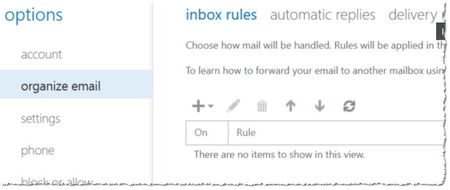
- Aug 07, 2023Seems Microsoft is releasing a new version of this functionality, and not all supported options are ported just yet. As a workaround, you can try accessing the older UI via direct link, i.e. https://outlook.office.com/ecp/email address removed for privacy reasons
It's still possible to access Inbox rules therein.


Joshua Bines
Oct 05, 2023Iron Contributor
Seems the old ecp is now not working at all 😞 I love PowerShell but I understand the difficulties for some admins to quickly view and update rules and setup auto replies where granting your access to content is not permitted. I would suggest the open mailbox option via the exchange admin centre is expanded to support this. I'd suggest everyone log tickets and make as much noise as possible if you would like another option.

Talamasca
Oct 07, 2023Copper Contributor
Hello,
Can you share a link to PowerShell script with the action that the rule actually does?
I found and edited many scripts, non of them contains that info, only rule name and general info.
Can you share a link to PowerShell script with the action that the rule actually does?
I found and edited many scripts, non of them contains that info, only rule name and general info.
- ViperThunderOct 08, 2023Copper Contributor
Talamasca trevorharrisABMG here posting from another account... Due to this issue I developed a PowerShell script for managing mailbox rules (sorry I cannot share it at this time due to company PII, but maybe soon I will post a cleaned-up version on my github). To see exactly what each rule is doing you can use cmdlet like below. Here is a small snippet from my script:
$mailboxname = get-exomailbox "username(at)yourcompany(dot)com" Write-host "Loading all mailbox rules for " -nonewline Write-host "$mailboxname" -foregroundcolor Green Write-host "`nPlease wait..." -ForegroundColor yellow $Rules = Get-InboxRule -Mailbox $MailboxName $Rules | Format-List Priority,Name,Description,Enabled- TalamascaOct 09, 2023Copper ContributorMuch appreciated 🙏
