Forum Discussion

Need to Block Gmail
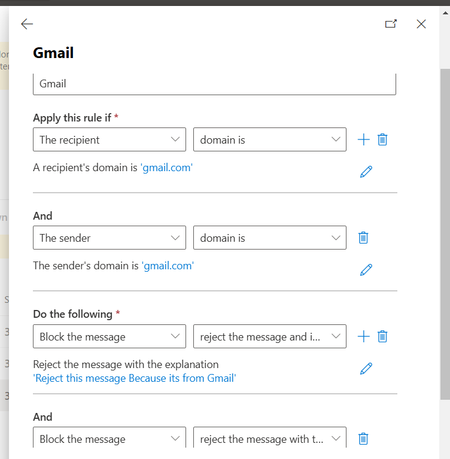

Hi devopsnetstager
To block emails sent to Gmail
1- Open the Exchange Admin Center.
2- Go to Mail Flow > Rules.
3- Click the plus sign (+) and select Create a new rule.
4- Give the rule a name.
5- In the Apply this rule if, select The sender is a member of... and choose di group you want to block.
6- In the Do the following, select Reject the message with the explanation... and enter a custom message explaining why the message was rejected.
In the Except if... section, select The recipient domain is... and enter the domain you want to block the user from sending emails to like Gmail
Click Save to create the rule.
Be sure that you have enabled the rule
To block emails received from Gmail. The same steps but with a few changes
Fell free to reach out and please mark as it accepted answers for others can profit from this discussion.