Forum Discussion

HCW - Hybrid Configuration Wizard for Hybrid Certificate
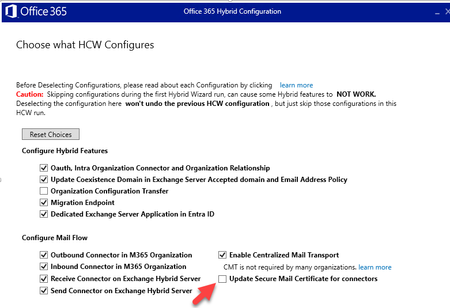

For a rerun whose only purpose is replacing the hybrid transport certificate, deselect everything except “Update Secure Mail Certificate for connectors.” Microsoft states that this updates the TLS certificate references on the Microsoft 365 connectors and on-premises send and receive connectors while preserving other connector settings. Deselecting other items skips them for this run; it does not roll back the hybrid configuration. Before HCW, install the new certificate on every hybrid server, include the required SMTP name, enable it for SMTP, and leave the old certificate installed. Export connector settings and schedule mail-flow tests. In HCW, choose the new certificate, review the final summary, then run the update. Afterward, test inbound and outbound hybrid mail flow and TLS, and inspect the HCW log. Remove the old certificate only after every hybrid server and connector references the new one. This granular route avoids rewriting unrelated coexistence, migration, OAuth, or centralized-transport settings.