Forum Discussion

HCW - Hybrid Configuration Wizard for Hybrid Certificate
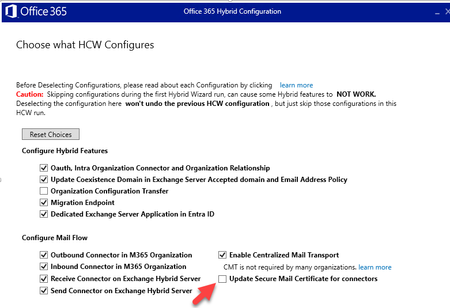

Yes. For a certificate-only change, deselect the other HCW options and select only Update Secure Mail Certificate for connectors.
The warning shown in your screenshot is the important part: deselecting an item does not undo the existing hybrid configuration. It tells HCW to skip that item during this run. Therefore, deselecting Enable Centralized Mail Transport does not turn off centralized mail transport; it simply prevents HCW from changing that setting while you update the certificate.
Before running HCW, make sure the replacement public certificate is installed on every on-premises Exchange server that handles hybrid mail flow, includes its private key, is valid for the required SMTP name, and is enabled for SMTP. Take note of the current connector and certificate settings first. Then run HCW during a change window, select the new certificate when prompted, and complete only the certificate update.
Afterward, test mail flow in both directions, including a message that follows the centralized transport path. Also confirm that the Exchange Online connectors and the on-premises hybrid send/receive connectors now reference the new certificate.
There is no need to manually modify the hybrid connectors with PowerShell merely to renew the certificate. HCW is the appropriate tool for this specific change. PowerShell is useful for checking the current configuration before and after the wizard, but changing connector settings manually at the same time makes troubleshooting harder.