Forum Discussion

Exchange Unified DLP Moderation Logging and Reporting

Reporting wise, Alerts should be your primary source, DLP-wise. You can also use the Activity explorer in the Compliance center: https://compliance.microsoft.com/datalossprevention?viewid=activitiesexplorer
The Unified audit log will contain all the events corresponding to actions taken by the user and/or any approver involved, and there are few other bits you can extract from the old SCC: https://protection.office.com/reportv2?id=DlpAllPolicyMatches&pivot=Source

VasilMichev
Thanks for your response. The "moderation" feature we are using is the DLP Action "Forward the message for approval to specific approvers". See attached DLP approval workflow screenshot to see how this option looks in my tenant.
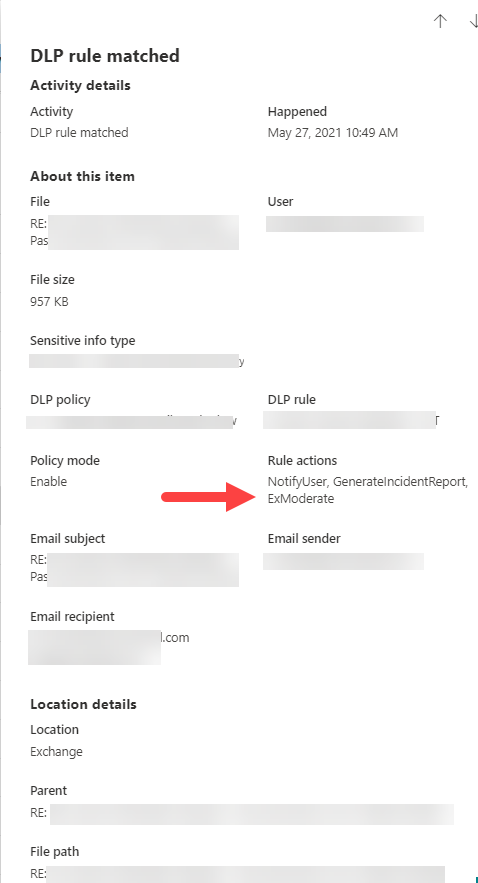
The term "moderation" comes from the "ExModerate" Rule Action that is shown in the DLP event Activity Details screen in the Data Loss Prevention Activities Explorer. See attached DLP exmoderate screenshot to see how this looks in my tenant.
As you can see from the Activity Details, you are unable to see the result of the ExModerate Rule Action. Did the approver approve or deny the message? I cannot see that in the Activity Details.
I have also looked in my DLP Alerts and have not been able to find out the approval/denial action.
Any other ideas on where I can get this information?
Thanks,
Brian

- VasilMichevJun 08, 2021MVPUh, totally forgot there are Exchange-specific actions in Unified DLP, and I just played with them few weeks ago. In any case, the best way to find the info is by checking the message trace. "SystemMailbox{bb558c35-97f1-4cb9-8ff7-d53741dc928c}" is the arbitration mailbox responsible for moderation requests, and the subject of the message will rely whether a given request was approved or denied.
Getting the actual reply is a bit trickier, as it gets automatically purged once it hits the system mailbox. So your only options there are eDiscovery/Search-Mailbox. Or maybe configure a transport rule to automatically BCC someone on moderation requests, so you can keep a track.