Forum Discussion

Nikolas_Athanasakis
Jul 14, 2021Copper Contributor
Exchange Server error in '/owa' application
ASSERT: HMACProvider.GetCertificates:protectionCertificates.Length<1 Description: An unhandled exception occurred during the execution of the current web request. Please review the stack tr...
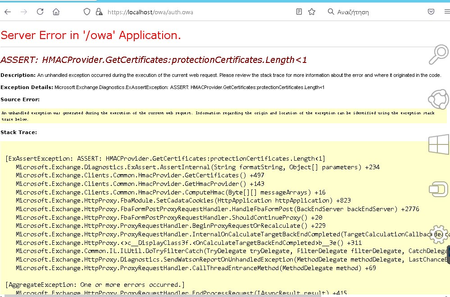
 Jul 14, 2021Ok i found solution. Use this to create new certificate https://docs.microsoft.com/en-us/exchange/troubleshoot/administration/cannot-access-owa-or-ecp-if-oauth-expired
And after creating the certificate you must wait like a hour or more for changes work. Restart dont change the wait time 🙂

vigna840
Nov 12, 2021Copper Contributor
Hi,
The issue has been sort it after we disable to McAfee and run the PowerShell command works as expected.
However one of the Exchange server failed to run the management shell.
Any idea? Please
The issue has been sort it after we disable to McAfee and run the PowerShell command works as expected.
However one of the Exchange server failed to run the management shell.
Any idea? Please

waaalex
Nov 12, 2021Copper Contributor
You should have red error message when launching exchange powershell.
You Can copy paste this error on Google.
Aldo, what is error message ?
You Can copy paste this error on Google.
Aldo, what is error message ?
 NULUSIOSDec 10, 2021Copper Contributor
I did the renewal process, as my Auth cert was expired.
For me both OWA and ECP are not working.
After doing everything, it still doesn't work.
I suspect I need to wait 2 hours until GMT "reaches" my local timezone.
From the other posts I suspect that certificate checking is done in GMT and not the local timezone.