Forum Discussion

Exchange Hybrid Wizard Error

Hello Barry,
Happy New Year 2025 😊!!
You execute the
Normally, the issues with Hybrid Configuration Wizard (HCW) for Exchange most of the time are navigate us to a solution.
Some of the steps you can take to work around the issue are below:
Increase Timeout Values:
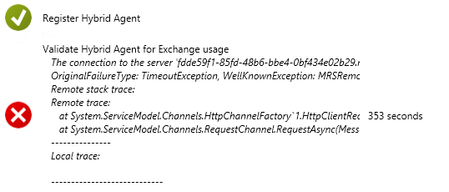
You can increase the timeout values in the configuration settings. This can be done by modifying the SendTimeout value in the binding configuration of your service.
You can set the SendTimeout value in your configuration file (e.g., web.config or app.config). Here's an example:
<configuration>
<system.serviceModel>
<bindings>
<wsHttpBinding>
<binding name="myBinding" sendTimeout="00:10:00">
<!-- Other binding settings -->
</binding>
</wsHttpBinding>
</bindings>
</system.serviceModel>
</configuration>
In this example, the sendTimeout is set to 10 minutes.
Check Network Connectivity:
Ensure that there are no network issues or firewall settings blocking the connection to the server fdde59f1-85fd-48b6-bbe4-0bf434e02b29.resource.mailboxmigration.his.msappproxy.net.
Verify MRSProxy Settings:
Make sure that the MRSProxy service is enabled and properly configured on the Exchange server. You can do this by running the following command in Exchange Management Shell:
Get-WebServicesVirtualDirectory | Set-WebServicesVirtualDirectory -MRSProxyEnabled $true
Restart IIS:
After making changes to the MRSProxy settings, restart Internet Information Services (IIS) using the iisreset command.
Check TLS Settings:
Ensure that TLS 1.2 is enabled on the server where the Hybrid Agent is installed.
Hope this helps 😊