Forum Discussion

Exchange Hybrid Deployment single forest multiple email domains

Got it, and after this I can run hcw, right?
another concern I have many users doesn't have their Proxy addresses populated in AD, though exchange does have these proxy address. I am thing I should populate them before running sync or it will break the incoming to these aliases once the migration is completed?

Abdul Farooque then you can run HCW, yes.
How can mailboxes have email addresses but they are not populated under the proxyaddresses attribute in AD? This seems to be a serious issue to me that should definitely be solved prior synchronization.
- PeterRisingJul 19, 2020MVP
- Jul 19, 2020
- PeterRisingJul 19, 2020MVP
If these particular domains are in Exchange Online only, then I would suggest you don't select them in the HCW, as per step 11 in the following;
- Jul 19, 2020
No Peter, this is something HCW team fix this..No such more friendly error. One thing I must mention here that there are couple of domains online (Accepted > MX>Online as well). These domains are not in On-premises Exchnage in Accepted list.
should I add them and try?
- PeterRisingJul 19, 2020MVP
- Jul 19, 2020
- PeterRisingJul 19, 2020MVP
OK, are the invalid domains configured in both Exchange On-premises, and Exchange Online?
- Jul 19, 2020
Yes, the invalid smtp domains error comes in the end when it try to configure mail flow.
- PeterRisingJul 19, 2020MVP
So does it still say "Invalid smtp domain name"? Is that the error you are referring to?
- Jul 18, 2020Yes, it passed the txt verification on second attempt for all domains and was stuck at adding federated domains for hours. I cancelled and started again ..
and now it stays with error I shown you. I think the dns lookup is forbidden/blocked and hcw can not verify...
How we can enable the dns lookup on dns servers or it will be working again after hours?
I think Microsoft should add if dns lookup fails it should check with another dns lookup site..it is just asking viewdns.info which is returning 403. - PeterRisingJul 18, 2020MVP
Have you tried quitting out of the the HCW and starting it again? That sometimes will help.
Also, I've seen the "HCW8108 Hybrid Configuration Service may be limited" message appear a few times myself lately. Seems to be a glitch that can safely be ignored.
- Jul 18, 2020
Now it is giving me hard time at domain proof txt verification..
Log:
ERROR* 10233 [Client=UX, Page=DomainProof, Activity=External DNS Query, Thread=26]
http://viewdns.info/dnsrecord/?domain=domainabcd.com
System.Net.WebException: The remote server returned an error: (403) Forbidden.
at System.Net.HttpWebRequest.GetResponse()I verified all records with ps "Test-FederatedDomainProof.ps" all looks good but wizard stay there with Waring and Next is gyred out..
Prior to this i also see this error on credentials verification screen "ERROR* 10309 [Client=UX, Thread=1] HCW8108 Hybrid Configuration Service may be limited."
- PeterRisingJul 18, 2020MVP
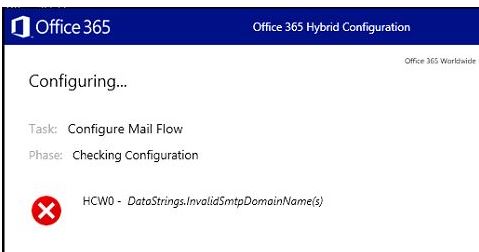
Hi, I must confess I am struggling to understand some of the steps you have taken, but in relation to the error you have received, take a look at this - https://support.microsoft.com/en-gb/help/3132123/datastrings-invalidsmtpdomainname-domain-error-when-you-run-the-office
- Jul 17, 2020
I ended up in this error... (Attached).
I also checked this link...https://support.microsoft.com/en-us/help/3067179/hybrid-domain-domain-isn-t-an-accepted-domain-for-the-cloud-organizati
Configuration:
AD obej synched with UPN ABC.com
2 domains/ were added in office 365 and their upn suffix also added in local AD> these domains are synched but all mailboxes for these two domains are online...say def.com and ghi.com are synched but mailbox are online licenses...no need to do anything with these domains...(they are in sync...but upn of users on these domains is their primary SMTP (user@def.com and user@ghi.com)not the UPN attribute for the Primary domain =ABC.com ( weird While I am synching UPN and users on these domains has different UPN, so how they could sync? I tested by creating a user user@def.com and it synched in few minutes.. may be adding UPN Suffix did this.
4 Exchange on-premises with CAS+MB.
19 accepted domains on these exchnage on-premises all active
3 domains are accepted domains but not in use (19+3).
-------------------------------
in office 365 > all 19 domains added and only verified with txt> no online service enabled.
Added UPN suffix for all these 19 domains in local AD.(ABC.com, already have two UPN suffix of def.com and ghi.com.
Ad Connect was not run after addition of UPN suffixes
HCW runs well...but while to tries to configure mailflow >>>>it shows error..
Should I remove the 19 UPN suffixes of on-premises email domains which are verified online and proceed?
- Jul 17, 2020
I ended up in this error... (Attached).
I also checked this link...https://support.microsoft.com/en-us/help/3067179/hybrid-domain-domain-isn-t-an-accepted-domain-for-the-cloud-organizati
Configuration:
AD obej synched with UPN ABC.com
2 domains/ were added in office 365 and their upn suffix also added in local AD> these domains are synched but all mailboxes for these two domains are online...say def.com and ghi.com are synched but mailbox are online licenses...no need to do anything with these domains...(they are in sync...but upn of users on these domains is their primary SMTP (user@def.com and user@ghi.com)not the UPN attribute for the Primary domain =ABC.com ( weird While I am synching UPN and users on these domains has different UPN, so how they could sync? I tested by creating a user user@def.com and it synched in few minutes.. may be adding UPN Suffix did this.
4 Exchange on-premises with CAS+MB.
19 accepted domains on these exchnage on-premises all active
3 domains are accepted domains but not in use (19+3).
-------------------------------
in office 365 > all 19 domains added and only verified with txt> no online service enabled.
Added UPN suffix for all these 19 domains in local AD.(ABC.com, already have two UPN suffix of def.com and ghi.com.
Ad Connect was not run after addition of UPN suffixes
HCW runs well...but while to tries to configure mailflow >>>>it shows error..
Should I remove the 19 UPN suffixes of on-premises email domains which are verified online and proceed?
- PeterRisingJul 10, 2020MVP
- Jul 10, 2020
Abdul Farooque exactly, what I mean is that you don't have to add all your 22 domains as an UPN suffix in your on-prem AD. For example, you are using just two UPNs:
- contoso.com
- fabrikam.com
Then only both need to be added in your AD, independent of the email address of the users (abc.com).
- Jul 10, 2020
PeterRising..got it Peter.
and I also tested that if I create a user in Exchnage on-premise and add a proxy field manually, it does populate to AD..So I am OK here, right?
- Jul 10, 2020
Ah! Let me explain this. You mean that if my users are already syncing with UPNs , than I don't need to add all emails domain in local AD to sync them up? and I can migarte mailboxes even their email domain or Primary email addresses are different than upn domain?
My understanding is "users are synced based on UPN( UPN domain is not email domain), since users have their Primary domains different than UPNs so I must sync them all , your thoughts?
- Jul 10, 2020
PeterRising Thank you so much.Appreciated.
- Jul 10, 2020
- Jul 10, 2020
PeterRising it depends. Authoritative should be set if all recipients are either synchronized or migrated to Exchange Online. If you have any kind of applications on-prem like printers, scanners etc. than you need a connector - not the hybrid connector, but it's already there so why change it. Always analyze your environment and then decide if things are necessary or not.
- PeterRisingJul 10, 2020MVP
Dominik Hoefling Abdul Farooque
What I would add to this is that once the HCW has run, you should no longer need the domains to be set as internal relay, and the connector should not be needed either. Coexistence should take care of things at this point.
- Jul 10, 2020
Abdul Farooque you mean if you create a remote mailbox in ECP which is hosted in Exchange Online? The proxy address attribute will be written back to your on-premises AD with AAD Connect. You don't need an UPN suffix for every email address, this is only required for your UPN in your on-prem AD.
It's weird that your email addresses aren't visible in the proxy address attribute in your AD ...
- Jul 10, 2020
Thank you. Do you think so that if a user is created in ECP with Proxy addresses but AD doesn't have that domain added as UPN Suffix,still that proxy address will be pushed down to AD?