Forum Discussion

EO Mobile Device Quarantine Showing GUID instead of Name
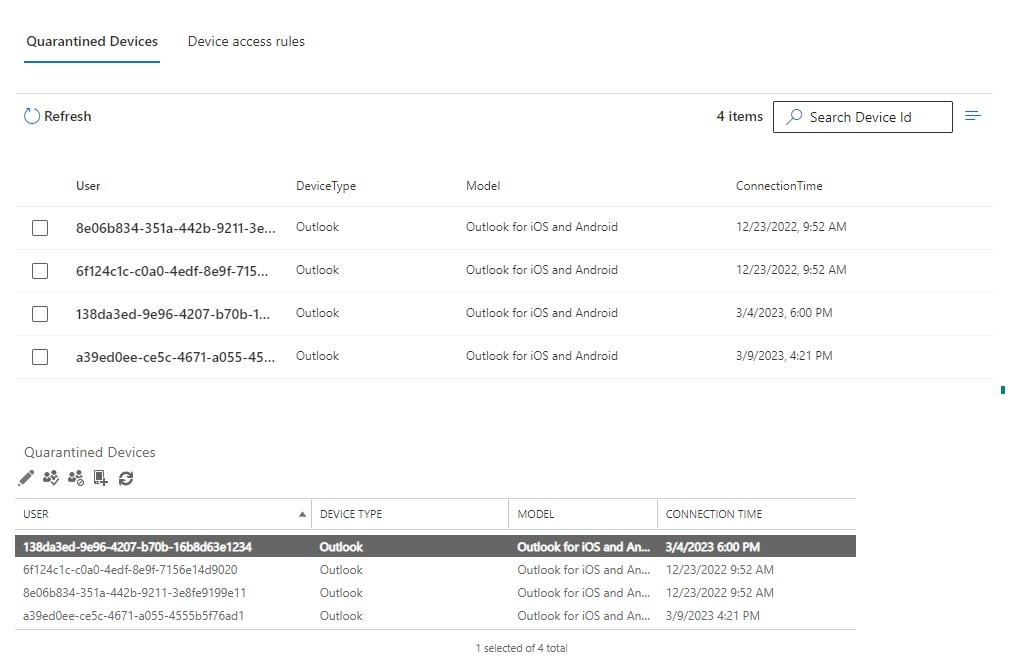

Regarding GUIDs vs Names, M365 is in a bit of transition phase. You might still see display names, while GUIDs are becoming more prevalent. The latter is the way, and have support use the Azure AD > Users portal to look people's GUID up before checking quarantined devices, or use PowerShell, e.g. to get all currently blocked devices including user (by dissecting the identity property):
Get-MobileDevice | Select @{n='Id';e={($_.Id -split '\\')[0]}},DeviceId,DeviceAccessStateReason,DeviceAccessControlRule

mderooij I don't understand why anone would want to see GUIDs in place of names in 365? I can understand using GUIDs for back-end management for unique identifiers, but no one working the front-end of the system knows their employees by their GUID number. I appreciate you showing how to look that up, but why should there be a need to go an extra step to identify the user? Also that means providing the help desk team even more access to Azure AD that they do not have right now.
How do we get the Mobile Device pages to display names instead of GUID?
- mderooijMar 13, 2023MVPAgree it's not pretty, also shows in other places (delegates). Apart from advocating your request, I would suggest upvoting the following on the feedback portal (which is monitored)
https://feedbackportal.microsoft.com/feedback/idea/46471c11-fd70-ed11-a81b-6045bdaf6a9e
https://feedbackportal.microsoft.com/feedback/idea/ffa5ce7f-b97a-ed11-a81b-6045bdaf6a9e