Forum Discussion

Announcing a new way to paste URLs, Link format!
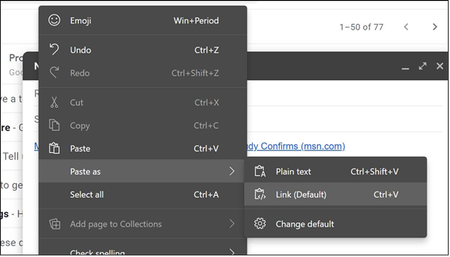

JaredB81 I should point out that these issues manifest with localized Microsoft.com. As an example, https://account.microsoft.com/privacy/?lang=ru-RU has the title "https://account.microsoft.com/privacy/?lang=ru-RU" because they transliterated Microsoft into Cyrillic. I expect that this will be a very common issue with non-Latin language pages hosted on sites that use non-IDN domain names.
JaredB81 Here is another bug. It takes some setup to get to a case I know fails. Open https://www.bing.com, type into the search box "История Киева." with a trailing period. Then select all but the period. This is necessary to work around another Edge bug. Right click on the selection and pick Search the sidebar for "История Киева". In the sidebar, click on IMAGES to display this pivot. Right click on the following image and pick Copy image link.
The clipboard will contain the following formats. The Cxxx values will likely vary. The bug is that the last three are all empty zero terminated strings, i.e. a single byte of zero. I have not tested to see if this is a problem because the image is a data URL or because the data URL is very long (12,056 characters) and some part of the code to generate the other formats has a URL length limit (e.g. INTERNET_MAX_URL_LENGTH) and silently fails while failing to suppress adding the failed result on the clipboard.
0010 Locale
0001 Text
0007 OEM Text
C0DA HTML Format
C2C1 Link Preview Format
C2C2 Titled Hyperlink Format
I sis submit this via the feedback mechanism. In my feedback I questioned whether Copy image link should be exposed at all for data URL encoded images as Copy image is more appropriate I would think.
- rshupakOct 09, 2020Iron Contributor
JaredB81 An issue with favorites and the new functionality. This is with canary build 666.
When I right click on a favorite in the favorites bar and select Copy, it honors the link setting and will generate the following clipboard formats
C0C6 HTML Format
C0D2 UniformResourceLocatorW
000D Unicode Text
C31E chromium/x-bookmark-entries
0010 Locale
0001 Text
0007 OEM TextWhen I right click on a favorite in edge://favorites or the new pinned favorites sidebar and click Copy link (note the different name and icon), it doesn't honor the setting and only generates the following formats.
000D Unicode Text
0010 Locale
0001 Text
0007 OEM TextIn canary 666, right clicking on the favorites menu, from the address bar icon, and selecting Copy link only generates the limited formats. In dev build 658, which doesn't have the new favorites menu and pinned sidebar, right clicking offers Copy not Copy link and it generates the richer set of formats honoring the link format setting.- JaredB81Oct 15, 2020Former Employee
rshupak thank you as always! I was on vacation last week and am still catching up.
When I right-click on the address bar in Canary today (671), I see "Copy" not "Copy link" and the appropriate formats get added to the clipboard when copying.Can you confirm that you observe the expected behavior in Canary build 671 (or later if you see this post in the next few days)?
Thank you!
- rshupakOct 15, 2020Iron Contributor
JaredB81 The address bar works in 672 for me. Favorites are still broken but functionality and inconsistent UI.
Favorite in favorite bar: Menu item named "Copy". The following formats generated:
C0C2 HTML Format
C0CE UniformResourceLocatorW
000D Unicode Text
C2D5 chromium/x-bookmark-entries
0010 Locale
0001 Text
0007 OEM TextFavorite in menu when clicking on a folder in the favorites bar. Menu item named "Copy". The following formats generated:C0C2 HTML Format
C0CE UniformResourceLocatorW
000D Unicode Text
C2D5 chromium/x-bookmark-entries
0010 Locale
0001 Text
0007 OEM TextFavorite in menu displayed when clicking favorites button in address bar. Menu item named "Copy link". The following formats generated:000D Unicode Text
0010 Locale
0001 Text
0007 OEM TextFavorite in new favorites sidebar pinned from favorites button in address bar. Menu item named "Copy link". The following formats generated:000D Unicode Text
0010 Locale
0001 Text
0007 OEM TextFavorite in edge://favorites/. Menu item named "Copy link". The following formats generated:000D Unicode Text
0010 Locale
0001 Text
0007 OEM TextThere is an address bar bug I did not mention. You can repro by visiting https://techcommunity.microsoft.com/t5/microsoft-edge-insider/ct-p/MicrosoftEdgeInsider. This issue relates to the behavior when selecting a subset of the address bar content. If the selection does not start at the left, only plain text is copied. This is fine. When you select from the left and the selection does not extend to the end of the host name, again, it is text only. To repro the problem, copy exactly "https://techcommunity.microsoft.com/". This will generate the following formats000D Unicode Text
0010 Locale
0001 Text
0007 OEM Text
C0C2 HTML Format
C2C7 Link Preview Format
C2B9 Titled Hyperlink FormatThe Link Preview Format content is the following, formatted for clarity{
"description": "",
"domain": "microsoft.com",
"favicon_url": "https://c.s-microsoft.com/favicon.ico?v2",
"image_url": "https://cdn.techcommunity.microsoft.com/lithium/TechCommunity-DefaultHero-2.png",
"preferred_format": "text/html;content=titled-hyperlink",
"title": "Home - Microsoft Tech Community",
"type": "website",
"url": "https://techcommunity.microsoft.com/"
}The Titled Hyperlink Format content is the following which may be corrupted by this site.Version:0.9
StartHTML:0000000105
EndHTML:0000000259
StartFragment:0000000141
EndFragment:0000000223
<html>
<body>
<!--StartFragment--><a href="https://techcommunity.microsoft.com/">Home - Microsoft Tech Community</a><!--EndFragment-->
</body>
</html>The problem is that the HTML Format content is a single byte of 0x00. I must admit this surprises me since I have always seen HTML Format and Titled Hyperlink Format as identical. If always so, why would generation of one work and the other not. If not always identical, how do they differ?Rich
