Forum Discussion

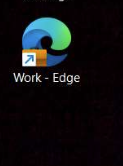
'Work - Edge' Desktop Shortcut Reappears after deleting and reopening Edge Browser
- Aug 29, 2023
Hi Everyone - The fix for this was released to Microsoft Edge Beta Version 117.0.2045.12. If you have access to the Beta Channel, please test and let us know if the issue has been resolved.
The fix should also be included in the next Stable release, which should be later this week if there are no delays. Thanks!
-Kelly


- KevHalOct 11, 2023Iron ContributorYes gave this script a go last night and worked absolutely fine.
We've added it now and any users affected will get the script running at logon, thanks to JASONPEEL for the script. Kromme_81Oct 11, 2023Copper Contributor
When i run the script nothing happens.
We are talking about this script?
$DesktopPath = [Environment]::GetFolderPath("Desktop")
$BadEdgeLnks = Get-ChildItem $DesktopPath | Where-Object {$_.Name -like "*Edge*.lnk"}
if ($BadEdgeLnks.Count -gt "1") {
foreach ($BadLnk in $BadEdgeLnks) {
Write-Host "Removing "$DesktopPath\$Badlnk""
Remove-Item "$DesktopPath\$Badlnk" -Force
}
}
$BadChromeLnks = Get-ChildItem $DesktopPath | Where-Object {$_.Name -like "*Chrome*.lnk"}
if ($BadChromeLnks.Count -gt "1") {
foreach ($BadChromeLnk in $BadChromeLnks) {
Write-Host "Removing "$DesktopPath\$BadChromeLnk""
Remove-Item "$DesktopPath\$BadChromeLnk" -Force
}
}
$BadTeamsLnks = Get-ChildItem $DesktopPath | Where-Object {$_.Name -like "*Teams*.lnk"}
if ($BadTeamsLnks.Count -gt "1") {
foreach ($BadTeamsLnk in $BadTeamsLnks) {
Write-Host "Removing "$DesktopPath\$BadTeamsLnk""
Remove-Item "$DesktopPath\$BadTeamsLnk" -Force
}
}