Forum Discussion

Why this policy is producing error? Configure new tab page URL
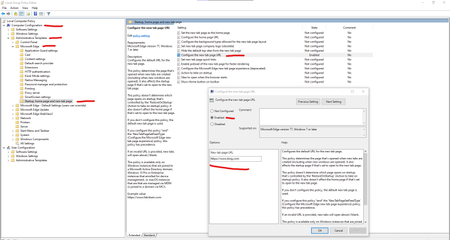

Gunnar-Haslinger wrote:HotCakeX Your machine needs to be MDM-Managed or AD-Joined, otherwise you get a "this policy is blocked" Error.
Workaround for non-MDM-Managed an non-AD-Joined Devices, have a look at my Blog-Post:
https://hitco.at/blog/apply-edge-policies-for-non-domain-joined-devices/
Thanks, I just finished reading your blog post, It is a workaround on those specific Windows versions but there are things that need to be considered:
- I'm using Windows 10 20H2 (release preview) and it might/might not work with those registry keys. and I don't want to use them in case it conflicts with something else somewhere in Windows that is still undocumented or just simply unknown.
- Windows 10 is always changing and evolving, this solution is a brute force method to achieve what I want.
I would rather have an explanation to know at least why this requires a domain controller or MDM to work. after all, what I was doing is just a test and I didn't want to fire up any servers to do a simple task like that, but apparently, I need to.
so again, these 3 are my main concerns and I want Edge team to consider as feedback and change the behavior (if possible) in the future:

HotCakeX I would wonder if you can trigger the edge-team to give you a satisfying answer or a change of the current behavior. This behavior is "by design" or "by choice of Microsoft". It is not a technical decision but a management decision.
- HotCakeXOct 20, 2020MVP
Gunnar-Haslinger wrote:HotCakeX I would wonder if you can trigger the edge-team to give you a satisfying answer or a change of the current behavior.
This behavior is "by design" or "by choice of Microsoft". It is not a technical decision but a management decision.
It's the tech community, I'm not necessarily asking them to change it, I just need a technical explanation that why it is what it is. also, it's feedback from a user and that's what they are asking for.
The 2nd part of it is pure speculations
- Gunnar-HaslingerOct 20, 2020Iron Contributor
I tried to get a solution / answer by opening a paid premier support ticket for this. This management-decision is not new, it was the same in Edge-Legacy. Answer is, it is a management-decision to pick some Policies not being manageably on devices not AD-joined or MDM-Managed.
If you like to have a more technical answer: Malware could easily use these Policies to for example set your Homepage - a regular user on a Home-Machine (non-managed) will have a hard job to find out what's wrong and what happened. On managed machines this would be cleared out / reset to admins-choice on next policy-apply-run.
- HotCakeXOct 20, 2020MVPSpoiler
Gunnar-Haslinger wrote:I tried to get a solution / answer by opening a paid premier support ticket for this. This management-decision is not new, it was the same in Edge-Legacy. Answer is, it is a management-decision to pick some Policies not being manageably on devices not AD-joined or MDM-Managed.
If you like to have a more technical answer: Malware could easily use these Policies to for example set your Homepage - a regular user on a Home-Machine (non-managed) will have a hard job to find out what's wrong and what happened. On managed machines this would be cleared out / reset to admins-choice on next policy-apply-run.
well of course malware can do that, but if malware exists on the system, your new tab page URL, or Edge settings in general, is the Least thing you need to worry about to be honest.
there are many scenarios I'm thinking about right now that renders this useless, if this is the only line of defense.
But yes I can see how it's related to security, I found 18 policies with this requirement and all of them, more or less, seem lucrative to hackers.