Forum Discussion

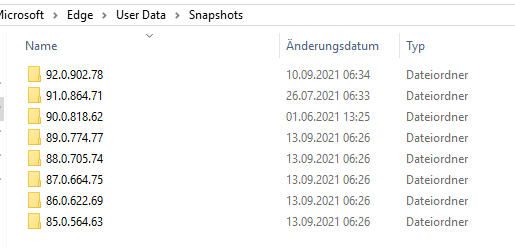
UserDataSnapshotRetentionLimit and Endless growing Edge Profile

 Microsoft
Joachim_T Hello! The team took a look at the screenshots you have provided it looks like the UserDataSnapshotRetentionLimit policy is set under User Configuration rather than Computer Configuration. If it is under User Configuration, this would also explain why the snapshots are being partially deleted. Each time the snapshots are cleaned up, it is only deleting the profile’s information from the user data folder and leaving all of the other users’ profiles information in the snapshot folder.
They suggest setting the group policy via Computer Configuration. Would you be able to give that a try?
Thanks!
-Kelly

Kelly_Y Hello,
I will try. But this would be a mess. we have several different OUs with different computer GPOs. Edge is so far only configured per user. If i have to split up the Edge config into an user and a computer part it will be quite complicated to maintain.
But again. Whats the trigger? When can i expect to see an effect of the new configuration? Next logon? Next new version installation (minor or major?)?
I didnt configure the user GPO before i mentioned the problem with the big profiles. Wouldnt the default of 3 for also the computer and user configuration prevent this failure as we can see it here if it would work at all?
- Joachim_TOct 10, 2022Iron Contributorsmithbe40 - No unfortuntaly not. At the moment i just have completely excluded the folder in CItrix Profile Management. That means i am not able to go back to an older version. Its a risk and means i need proper testes before rollout. But on the other hand it never happend yet.
Jocachim  smithbe40Oct 10, 2022Copper ContributorJoachim_T - Did you ever figure this out? I am also trying to apply the same group policy to Edge and Chrome, but the number of snapshots is more than 3 for most of my environment. I did verify the policy is applied, but I'm wondering if a browser upgrade triggers the cleanup or ?. Win10 LTSB and Server 2016 Citrix UPM environment here.