Forum Discussion

Josh_Carpenter
Jun 15, 2020Brass Contributor
URL Shortcuts not working in Edge
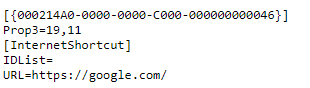
Good evening When we used IE11 we use to have shortcuts on all workstations to a specific webpage, this was created by dragging the url from the addressbar to the desktop to create a .website fil...

mchalapetr
Jan 19, 2021Copper Contributor
Hi Kelly_Y,
This does not work for me (Win 10 Enterprise 1909, MS Edge v. 87.0.664.75) but our IT team is supposedly working on it.
My guess is that our company links use a lot of special characters in their URLs and this somehow screws it up. Some methods that I tried worked with only simple URLs (i.e. google.com) but not with more complex ones.
The original solution in this thread seemed elegant to me but is not very lasting so what I do now is manually create shortcut on desktop with target: %windir%\explorer.exe microsoft-edge:URL.
The URL is of course substituted by some web address and this seems to work every time.

JZehring
Nov 15, 2022Copper Contributor
Worked for me! Thanks.