Forum Discussion

URL Shortcuts not working in Edge
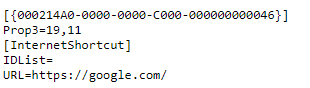

Josh_Carpenter I am having the same issue after I used Windows Settings, Default Apps to set Edge as the default browser after using Firefox as the default previously. Mine look like
[InternetShortcut]
URL=https://www.howtogeek.com
EDIT: Actually I just figured it out. I went into the Settings, Default Apps, then used the link at the bottom for Choose default apps by file type. Scrolled down to URL and set it to 'Internet Browser' with the house icon instead of Edge, and then went back to the Settings, Default Apps and set Edge as the Web browser again and URLs started to open correctly with Edge.

We experience the same problem and your workaround is probably the best solution yet...
EDIT:
I just discovered that this fix doesn't work after restart. Sadly it must be reset every time after restart. Maybe some script could do that after power up.
- Kelly_YJan 19, 2021
Microsoft
mchalapetr Josh_Carpenter joshhuggins Hi Everyone! It looks like you are having an issue creating desktop shortcuts for Microsoft Edge.
You should be able to create a shortcut on the desktop by clicking on the icon next to the URL in the address bar (usually a lock icon) and dragging it onto the desktop. I was able to create a new shortcut on my desktop to this discussion thread.
Another option is to right click on your desktop -> New -> Shortcut and fill out the information in the pop up window.
If you are still having an issue, would you be able to share your OS version and MS Edge version? Thanks!
-Kelly
- mchalapetrJan 19, 2021Copper Contributor
Hi Kelly_Y,
This does not work for me (Win 10 Enterprise 1909, MS Edge v. 87.0.664.75) but our IT team is supposedly working on it.
My guess is that our company links use a lot of special characters in their URLs and this somehow screws it up. Some methods that I tried worked with only simple URLs (i.e. google.com) but not with more complex ones.
The original solution in this thread seemed elegant to me but is not very lasting so what I do now is manually create shortcut on desktop with target: %windir%\explorer.exe microsoft-edge:URL.
The URL is of course substituted by some web address and this seems to work every time.
 JZehringNov 15, 2022Copper ContributorWorked for me! Thanks.
