Forum Discussion

SmartScreen turned off -> Java Webstart JNLP Files are marked as "can harm your computer"
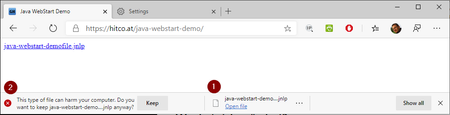
- Aug 12, 2020
Starting with Edge v85 (currently in beta) there is a new policy "ExemptDomainFileTypePairsFromFileTypeDownloadWarnings" available which solves this issue:
See Documentation:
I can confirm this works with
Edge Beta 85.0.564.30
Edge Dev 86.0.594.1
BUT be aware: The text in the documentation is correct, but the given Samples in the documentation are currently wrong!
Citing the Sample in the docs:SOFTWARE\Policies\Microsoft\Edge\ExemptDomainFileTypePairsFromFileTypeDownloadWarnings\1
= {'domains': ['https://contoso.com', 'contoso2.com'], 'file_extension': 'jnlp'}
The single quotes in the examples are wrong, only double quotes are accepted and work! So this should be corrected to:
= {"domains": ["https://contoso.com", "contoso2.com"], "file_extension": "jnlp"}To check my JNLP JavaWebStart Sample-Link https://hitco.at/java-webstart-demo/ successfully working, use following registry-Keys:
Windows Registry Editor Version 5.00

[HKEY_LOCAL_MACHINE\SOFTWARE\Policies\Microsoft\Edge\ExemptDomainFileTypePairsFromFileTypeDownloadWarnings]
"1"="{\"domains\": [\"https://*.hitco.at\", \"https://hitco.at\"], \"file_extension\": \"jnlp\"}"

Uaslam I have no Idea how you configured this policy to produce an edge://policy Screenshot showing two separate entries (two separate lines). The policy seems to be designed to configure one extension per entry allowing to address multiple domains per entry/extension. But even if I try to do it how I guess you did it (adding two policies for "eml" Extension) I cannot reproduce a screenshot like yours. As you made the interesting part unreadable I'm not able to help.
I suggest to start with this single line globally setting eml not to be harmful, if this works you can play arround to find out what's wrong with your domain-entries.
Regedit-File:
[HKEY_LOCAL_MACHINE\SOFTWARE\Policies\Microsoft\Edge\ExemptDomainFileTypePairsFromFileTypeDownloadWarnings]
"1"="{\"domains\": [\"*\"], \"file_extension\": \"eml\"}"

Hello everyone,
First of all, thank you very much for your contributions Unfortunately the solution doesn't work for me yet.
Maybe a mistake was included ... I would be very grateful for your help
Path in Registry:
Computer\HKEY_LOCAL_MACHINE\SOFTWARE\Policies\Microsoft\MicrosoftEdge\ExemptDomainFileTypePairsFromFileTypeDownloadWarnings
Thanks alot
Theo
- Antony PaulJul 20, 2021Copper Contributor
Oh dear how embarrassing. A rookie mistake. I had been focused on the Onedrive URL and not even noticed they were different.

Thanks for pointing that out and it is now working as expected. I suspect my issue with the other domain is similar!
Cheers
- Gunnar-HaslingerJul 20, 2021Iron Contributor
Antony Paul your Policy-Screenshot shows a different domain than your link:
https://nottinghill.sharepoint.com
https://nottinghill-my.sharepoint.com - Antony PaulJul 20, 2021Copper Contributor
Your advice on this thread has been very useful for me when testing this policy so thank you for that
Has anyone else had issues getting this to work when specifying a domain? I am trying to solve an issue where smartscreen is by default blocking the downloading of msg files in Edge (Version: 1.3.145.49) and the users have to override the warning by selecting keep each time.
If I use a wildcard for the domains it works correctly and the file downloads without the smartscreen prompt.
But if I want to lock this down to a specific domain, in this case our sharepoint, the file is blocked by smartscreen
The redacted link of the msg file
https://nottinghill.sharepoint.com/:u:/r/loremipsum/Shared%20Documents/1061689.msg?csf=1&web=1&e=Tb4Qne
I have tried adding * before and after but no joy
I have replicated this behaviour with another domain as well.
Very puzzling
- Gunnar-HaslingerJul 14, 2021Iron Contributor
Theo2424 your screenshot shows that your registry-Key is not formatted right.
My "regedit code sample" was not provided to be copied into regedit but in a .reg file to import in regedit, therefore escaping of the quotes is needed in .reg Files but not in regedit graphical Editor itself.
Compare with this working screenshot: