Forum Discussion

Internet Explorer mode in Edge is not working
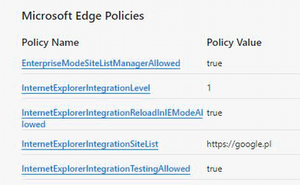

Microsoft Edge: Version 101.0.1210.39 (Official build)
So version is higher than 92.
Machine was rebooted couple times .

 youngjediJul 07, 2022Copper Contributor
Hi Greg, I did figure it out.
What the setting were in the Sites.xml file was wrong. I at first used what was in the example that allowed me to copy and I had also tried the tool to make this work. But it would not work either way. I finally found someone in my organization but with a different department who had one that I was able to modify. I am not sure why MS would have offerings that would not work. And they did not necessarily give the best directions on creation of the sites list.
- Greg_AJul 07, 2022Iron Contributor
youngjedi
Ok that's good to know. I am using the enterprise cloud site list (https://docs.microsoft.com/en-us/deployedge/edge-ie-mode-cloud-site-list-mgmt), but my Service Desk was reporting to me that there are some users that don't even have the IE mode settings available in edge. rafalw15851895 mentioned this issue also. For everything that I've tested, the cloud site list is working perfectly fine- youngjediJul 07, 2022Copper ContributorGlad to hear that Greg. Looks like we both have our solutions.