Forum Discussion

Gunnar-Haslinger
Apr 09, 2022Steel Contributor
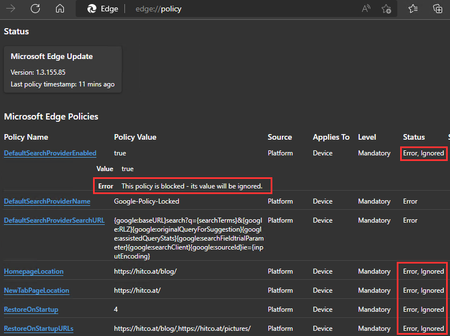
Bug: Edge Beta 101 on Start: This policy is blocked - its value will be ignored.
This Bug affects only Edge Beta 101.0.1210.10 as well as current Edge Dev and Canary. Current Stable Edge 100.0.1185.36 ist NOT affected and works fine! All Policies which are documented as "Thi...

Gunnar-Haslinger
Apr 29, 2022Steel Contributor
Edge v101.0.1210.32 is now offered as Stable-Release and I can confirm Policies work like expected.
Side-Note: Google Chrome v101 seems to be affected, seems Google didn't fix this in time like Microsoft did.
Link to Google-Chrome Issue: https://bugs.chromium.org/p/chromium/issues/detail?id=1320281

mkruger Microsoft
Apr 29, 2022MicrosoftThanks again for the further testing!
Ouch, I did test try testing out on Chrome at first and did not find a similar issue and thought it may be an Edge specific problem. On testing for Chromium, I found the problem did exist there. I reported the issue Chromium and it looks like they are merging the fix from that in the issue you linked.
My theory at the time was that some of the Cloud Based management code for Google Workplace was performing some initialization that was missed when it was disabled. If that is disabled in some manner in your environment, that may be what is causing this to be seen in Chrome too. Just a guess though, looks like Google will have a fix out soon for you.
For reference, here is the issue I filed:
https://bugs.chromium.org/p/chromium/issues/detail?id=1316052
Ouch, I did test try testing out on Chrome at first and did not find a similar issue and thought it may be an Edge specific problem. On testing for Chromium, I found the problem did exist there. I reported the issue Chromium and it looks like they are merging the fix from that in the issue you linked.
My theory at the time was that some of the Cloud Based management code for Google Workplace was performing some initialization that was missed when it was disabled. If that is disabled in some manner in your environment, that may be what is causing this to be seen in Chrome too. Just a guess though, looks like Google will have a fix out soon for you.
For reference, here is the issue I filed:
https://bugs.chromium.org/p/chromium/issues/detail?id=1316052