Forum Discussion

Internet Explorer mode in Edge is not working
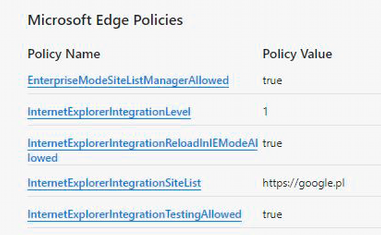


Hi John,
Glad that you got it worked.
Note that it is better to use the Enterprise Site List Manager in Edge to ensure the Enterprise Mode Site List matches the latest schema version (currently schema v.2). You can go to the URL edge://compat/SiteListManager and import the current file. Remember, this tool is not updating in real-time. I will clear the list first, import the current file, edit as necessary, and export the result.
The standalone tool will continue to be available in the Download Center but won't get any feature updates.
Reference: https://docs.microsoft.com/en-us/DeployEdge/edge-ie-mode-site-list-manager
Regards,
Ken
 gabbstikzMar 28, 2023Copper Contributor
hi ken,
Please i have an issue with my Microsoft edge not been able to reload in internet explorer mode, i am currently using the latest Microsoft edge Version 111.0.1661.54 (Official build) (64-bit),
i have turned on allow site to be reloaded in IE mode, but whenever i try to reload a site in IE mode, it never switches to IE mode, and keep rolling as if trying to switch, i have uninstall and reinstall IE11 in optional features but the issue persist.
pls what can i do, i need it for my work, because the company i work for runs a website only accessible on IE mode
expecting your reply.
Regards
Gabriel