Forum Discussion

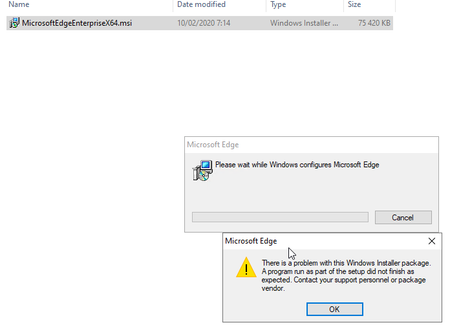
Installing MicrosoftEdgeEnterpriseX64.msi - Error 1722
 Mar 23, 2020
Today I retried the MSI install on a computer where it failed last week, and this time the installation went through without any hazzle. The only thing I *know* had changed was that the 2020-03 windows patches had been installed.

Product: Microsoft Edge — Error 1722. There is a problem with this Windows Installer package, Event 11722
May be related to a GPO settings you have active
This issue keeps resurfacing overy years now, and we most commonly encounter it in customer environments running parallel systems—such as Citrix alongside VDI—but it also appears in traditional Windows desktop deployments.
Our observations suggest a strong correlation with scenarios where the same user account is actively used across multiple platforms at the same time (for example, Citrix and a local fat client session). This concurrent usage pattern introduces state conflicts that are difficult to trace and often environment-specific.
As a result, the problem tends to surface primarily in SBS or large enterprise environments rather than in smaller, single-platform setups. Troubleshooting can be particularly challenging, as the root cause is often linked to Group Policy Object (GPO) configurations that are widely misunderstood or incorrectly interpreted.
Solution:
We have pulled all information once again together here and show you how to solve it in detail:
https://www.butsch.ch/post/product-microsoft-edge-error-1722-there-is-a-problem-with-this-windows-installer-package-event-11722/
If you enable this policy, Microsoft Edge Update handles Microsoft Edge updates according to how you configure the following options:
Updates disabled (0): Updates are never applied.
Always allow updates (1) (recommended): Updates are always applied when found, either by periodic update check or by a manual update check.
Manual updates only (2): Updates are applied only when the user runs a manual update check.
Automatic silent updates only (3): Updates are applied only when they’re found by the periodic update check.
If you select manual updates, make sure you periodically check for updates by using the app’s manual update mechanism, if available. If you disable updates, periodically check for updates, and distribute them to users.
If you don’t enable and configure this policy, Microsoft Edge Update handles available updates as specified by the ‘Update policy override’ policy.
This policy is available only on Windows instances that are joined to a Microsoft® Active Directory® domain.