Forum Discussion

Impossible to navigate in Skype for Business server 2015 Control Panel IE mode
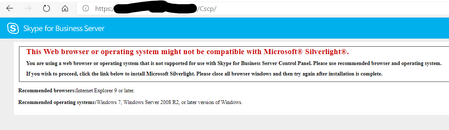

Silverlight is deprecated, outdated technology.
Silverlight-Support doesn't exist in any modern Browser.
You have to use Internet Explorer to get Silverlight-Support or configure Edge in IE Mode for this particular site.
 el-feJan 31, 2020Brass Contributor
Gunnar-Haslinger the skype control's panel url is already setted up to use the Edge IE mode.
And it works as you can see bellow :
But if I click on "Users" menu it doesn't work anymore.
I don't understand why it works with the home page of the skype control panel but doesn't when I navigate.
- Gunnar-HaslingerFeb 02, 2020Steel Contributor
el-fe your screenshots show, that only the first one is using IE-Mode, the second one isn't - you can easily spot it from the IE-Icon left to the padlock, which isn't showing up in the second screenshot:
- el-feFeb 03, 2020Brass Contributor
Gunnar-Haslinger the second screenshot was taken just after clicking on the "Users" menu from the control panel.
This is what I've setted in the xml file for the control panel :
<site url="SfBControlPanelURL">
<compat-mode>default</compat-mode>
<open-in>IE11</open-in>
</site>