Forum Discussion

Ling_Gao
Dec 03, 2021Tin Contributor
IE Compatibility Mode on Microsoft Edge.
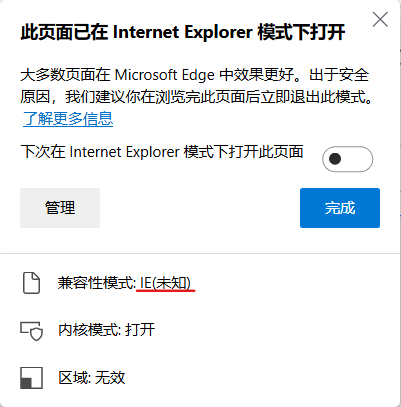
Dear Microsoft Edge Team, Hello! I'm currently using Windows 11 Insider Preview Build 22509. When I open the site in IE mode, I am prompted that I am using "IE (unknown)" compatibility mode at th...

Kelly_Y Microsoft
Dec 06, 2021MicrosoftLing_Gao Hello! There are a couple of ways to open a site in IE mode. First is using group policy (What is Internet Explorer mode? | Microsoft Docs) and the second is reloading individual sites in IE mode manually (Settings and more (the ellipses icon ...) > Reload in Internet Explorer mode).
When using policy you can select the site to load in specific document modes.
When manually selecting "Reload in Internet Explorer mode" under settings, I have seen it will say "Compatibility Mode: IE(Unknown)" but just for a short amount of time as the page is loading and then it changes to "Compatibility Mode: IE11" Is this the scenario you are experiencing?
-Kelly