Forum Discussion

How to exactly use IE mode on Edge canary?
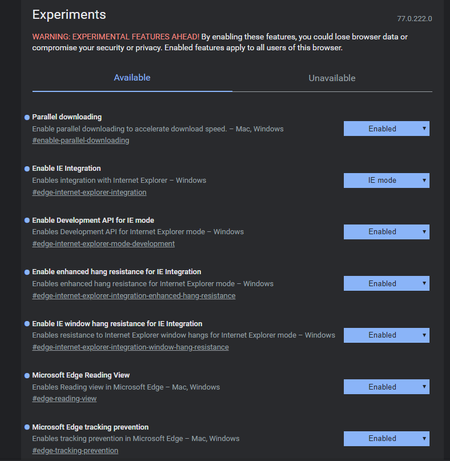

It still works, but the button was removed. I guess that's because of the announcement that they would restrict the access to the IE mode.
If you use the OLD IE/Edge policies in Windows, you can add an Enterprise Compatibility list and the added domains will open in IE mode.
The syntax was expanded:
<site url=contoso.com>
<open-in app=true>IE11</open-in>
</site>
The app=true part forces Edge to open the full IE browser in a seperate window. If you don't use that, Edge will try to open IE in the same tab. That's what I learned through reading and experimenting.
See:
https://docs.microsoft.com/en-us/deployedge/edge-ie-mode

Klose_BW Will this new schema item also be reflected in the Enterprise Mode Site List Manager?
The most recent download ist from 2016: https://www.microsoft.com/en-us/download/details.aspx?id=49974
 Adrian_GutaJul 25, 2019Former Employee
stesch79 @Klose_BW the correct syntax is
<site url=contoso.com>
<open-in app="true">IE11</open-in>
</site>There will be an update to the Enterprise Site List manager tool, but I don't have a timeline to give at this moment.
- stesch79Jul 25, 2019Iron Contributor
Adrian_Guta Yes indeed! Now it works! They better correct the guide https://docs.microsoft.com/en-us/DeployEdge/edge-ie-mode#updated-schema-elements :-)