Forum Discussion

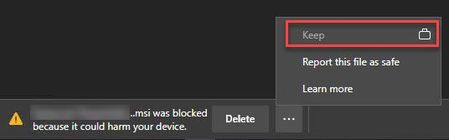
GPO PreventSmartScreenPromptOverrideForFiles

 Microsoft
re_bl Hi! I just took a look at our policy documentation. Have you tried to use the
SmartScreenAllowListDomains Policy? (https://docs.microsoft.com/en-us/deployedge/microsoft-edge-policies#smartscreenallowlistdomains)
It mentions "Configure the list of Microsoft Defender SmartScreen trusted domains. This means: Microsoft Defender SmartScreen won't check for potentially malicious resources like phishing software and other malware if the source URLs match these domains. The Microsoft Defender SmartScreen download protection service won't check downloads hosted on these domains."
Thanks!
-Kelly
 re_blFeb 18, 2021Brass Contributor
Kelly_Y To Configure the GPO Configure the list of Microsoft Defender SmartScreen trusted domains, has none effect. Its still not working.
- Kelly_YFeb 18, 2021
re_bl Thanks for following up! I've reached out to the team to see if they have any recommendations. We will follow up if they have any information/insights.
-Kelly
 PeRichMar 17, 2021Brass Contributor
Same here. Additionally disabled
If you disable this setting, "potentially unwanted app blocking with Microsoft Defender SmartScreen is turned off."