Forum Discussion

"Enable deleting browser history and download history" policy
- Dec 05, 2019
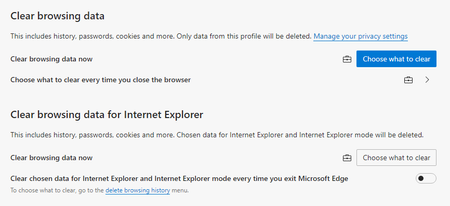
Okay, so I worked it out.
The briefcase icon is shown, even if the corresponding IE Group Policies are not configured. This probably counts as a bug, but maybe it's hard to implement the correct detection for this. Changing the button to blue should be an easy fix.
I also set the following policies alongside my Edge policies, and now it behaves as expected. These policies were NOT set previously in IE in my environment.
Computer Configuration/Windows Components/Internet Explorer/Delete Browsing History
Prevent deleting download history = Enabled
Prevent deleting websites that the user has visited = Enabled

Okay, so I worked it out.
The briefcase icon is shown, even if the corresponding IE Group Policies are not configured. This probably counts as a bug, but maybe it's hard to implement the correct detection for this. Changing the button to blue should be an easy fix.
I also set the following policies alongside my Edge policies, and now it behaves as expected. These policies were NOT set previously in IE in my environment.
Computer Configuration/Windows Components/Internet Explorer/Delete Browsing History
Prevent deleting download history = Enabled
Prevent deleting websites that the user has visited = Enabled
- HotCakeXDec 05, 2019MVPNice, those policies need to be included in the Edge's group policy configuration files too
