Forum Discussion

Edge UpdatePolicy - Disable automatic updates leads to "Microsoft Edge is out of Date"
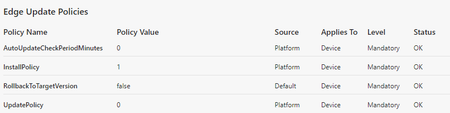
- Aug 30, 2021
Hey Kelly_Y,
As there were some new customer-Tickets opened the last days I did some more debugging and compared "old" machines which seem to work fine with newer ones which have this issue.
MicrosoftEdgeUpdate.log doesn't give any hints. Log of machines having this issue look exactly the same like machines which are fine.
I compared the Registry Key/Values of EdgeUpdate in depth and found the solution as follows:
This setting works fine:
[HKEY_LOCAL_MACHINE\SOFTWARE\WOW6432Node\Microsoft\EdgeUpdate\ClientState\{56EB18F8-B008-4CBD-B6D2-8C97FE7E9062}]
"brand"="GCEU"
But on the newer machines having this issue the value "brand" is configured "GGLS" instead of "GCEU". I tried it both ways:
- I configured a good machine to "brand"="GGLS" => Restart Edge => Brings warnings. => configured back to "brand"="GCEU" => Restart Edge => No Warning, OK.
- I configured a "bad" machine which has this issue from "brand"="GGLS" to "brand"="GCEU" => OK, after restarting Edge the warning doesn't pop up again, Problem solved.
According to docs.microsoft.com - Windows diagnostic events and fields this value seems to have following semantic: appBrandCode The 4-digit brand code under which the the product was installed, if any. Possible values: 'GGLS' (default), 'GCEU' (enterprise install), and '' (unknown).
Both Machines are Windows 10 Enterprise v1909, same hotfixes applied. I have no Idea why "brand" is configured "GGLS" in the newer installed ones. But I have the idea that this is because of EdgeHTML was replaced by EdgeChromium out of the box on the newer Installation-ISO-media which is used for our unattended deployment. Seems the included EdgeChromium in the new ISO-Image has this preconfigured in a wrong way?


 Microsoft
Gunnar-Haslinger Happy Friday! Yes, I've reached out to the team about the message. We'll let you know any updates or if there are any follow up questions. 🙂 Thank you!
-Kelly
MicrosoftGunnar-Haslinger Hi! Couple of things we wanted to confirm and just double check.
-
Is the AutoUpdateCheckPeriodMinutes policy set to 0 so all auto-update checks are disabled? (Basically since you folks are controlling the updates)
- Did this issue with the "Microsoft Edge is out of Date" message always happen or was this something users started noticing recently? If recently, can you estimate around a specific version number?
Thank you!
-Kelly
- Gunnar-HaslingerAug 23, 2021Steel ContributorHi Kelly_Y,
thanks for your questions, answers as follows:
Yes, as you see in my Edge Updates Policies Screenshot in my initial post AutoUpdateCheckPeriodMinutes ist set to 0. These devices had no chance to reach Microsoft-Servers/Internet, never - not a single second in their lifetime. I have no idea why they are complaining about "Microsoft Edge is out of Date" ... this seems to be kind of "timebomb", because they cannot grab this information from an update-server.
We didn't see this behavior until we updated to v90 in June. Next update of this machines will be v93 in September ... the machines started complaining to be out of date in late July 2021 / beginning of August 2021. Not all of them show this behavior - my best guess is, that only machines which where new installed during June/July with Edge v90 as initial Edge Version show this behavior. Those installed several month before which had Edge v87 installed and were updated to v90 in June seem to behave correct and don't show this messages. But this is just a guess - I cannot verify this because not all Users open a ticket, some just keep clicking without notifying us. But those who complained about definitely had fresh installed machines where Edge v90 was the first Edge-Version which was installed.- Kelly_YAug 27, 2021
Gunnar-Haslinger We've been continuing conversations internally about your issue 🙂 Would you be able to provide the latest MicrosoftAutoUpdate.log/MicrosoftEdgeUpdate.log from one of the devices?
Should be found at %ALLUSERSPROFILE%\Microsoft\EdgeUpdate\Log\MicrosoftEdgeUpdate.log (You can send it via message if you prefer.)
Thanks!
-Kelly
- Gunnar-HaslingerAug 30, 2021Steel Contributor
Thanks Kelly_Y
Here you find my full MicrosoftEdgeUpdate.log: https://link.hitco.at/EdgeUpdate-Log
The machine I took this LogFile from was fresh installed on 08. July 2021 - same date where the Log starts. Machine was only used for a few times as you can see when looking at the date/timestamps in the log. It is displaying the warning every time edge starts, as I described and screenshotted above. It was never connected to the internet, we update and patch those machines via MSI-Deployment (not a Microsoft Update Infrastructure like WSUS).
[08/30/21 08:32:47.817][MicrosoftEdgeUpdate:msedgeupdate][2336:3868][DllEntry]["C:\Program Files (x86)\Microsoft\EdgeUpdate\MicrosoftEdgeUpdate.exe" /ua /installsource core]
[08/30/21 08:32:47.817][MicrosoftEdgeUpdate:msedgeupdate][2336:3868][C:\Program Files (x86)\Microsoft\EdgeUpdate\1.3.143.57\msedgeupdate.dll][version 1.3.143.57][opt][official]
[08/30/21 08:32:47.817][MicrosoftEdgeUpdate:msedgeupdate][2336:3868][is machine: 1][Current dir][C:\Program Files (x86)\Microsoft\EdgeUpdate\1.3.143.57]
[08/30/21 08:32:47.817][MicrosoftEdgeUpdate:msedgeupdate][2336:3868][GoopdateImpl::DoUpdateAllApps]
[08/30/21 08:32:47.832][MicrosoftEdgeUpdate:msedgeupdate][2336:3868][OS EULA check returned false or failed][0x00000000]
[08/30/21 08:32:47.832][MicrosoftEdgeUpdate:msedgeupdate][2336:3868][IsEULAAccepted][OOBE completed]
[08/30/21 08:32:47.832][MicrosoftEdgeUpdate:msedgeupdate][2336:3868][ShouldCheckForUpdates returned 0][checks disabled]
[08/30/21 08:32:47.832][MicrosoftEdgeUpdate:msedgeupdate][2336:3868][Update check not needed at this time]
[08/30/21 08:32:47.832][MicrosoftEdgeUpdate:msedgeupdate][2336:3868][Update all apps process finished][0x0]
[08/30/21 08:32:47.832][MicrosoftEdgeUpdate:msedgeupdate][2336:3868][DllEntry exit][0x00000000]