Forum Discussion

Browser Essentials - Icon Removal
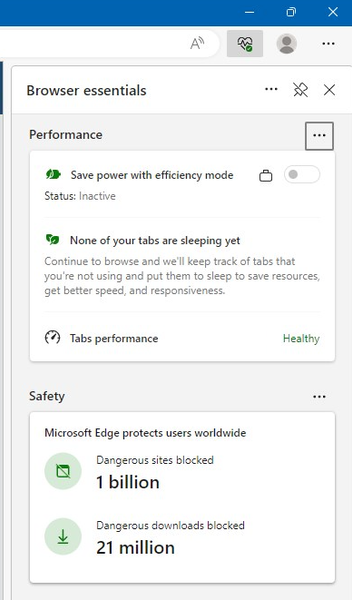

Microsoft should be providing the Group Policy BEFORE they deploy these Spam and advertising icons. We have disabled the BING bar and shopping and everything else.
It is like playing wack a mole with advertising now. It is worse than Spyware.

However, you still have control over privacy.
The data related to dangerous site and dangerous download is by the SmartScreen filter which you could disable them and when you do, it won't show any data.
However, when you enable SmartScreen filter even if you disable this feature, data will be shared so it could detect and block malicious websites.
- Kelly_YAug 07, 2023
Microsoft
Microsoft Edge Stable v115.0.1901.200 and Extended Stable v114.0.1823.106 was released today. Please provide any feedback after testing. Thanks!
-Kelly
- Kelly_YAug 04, 2023
Just FYI, it looks like there might be some delays with Microsoft Edge Stable and Extended Stable this week. You can take a look at the Release Notes (Microsoft Edge release notes for Stable Channel | Microsoft Learn) for notification of when they are deployed. Thanks!
-Kelly
 JLowisAug 02, 2023Copper ContributorThank you for the update. I look forward to testing it out.
- Kelly_YJul 31, 2023
JLowis Danny0132 lforbes JoachimT Hello All - The PinBrowserEssentialsToolbarButton policy is now available to hide the Browser essentials button on the toolbar. Policy information here: https://learn.microsoft.com/en-us/deployedge/microsoft-edge-policies#pinbrowseressentialstoolbarbutton
It is currently available in Microsoft Edge Beta Channel 116. The latest Beta was just released today, Version 116.0.1938.36. For Stable 115 and Extended Stable 114, the policy should be available in the upcoming releases for those channels this week.
Thanks for your feedback!
-Kelly
- Kelly_YJun 27, 2023
JLowis Hello - Have you tried using the ShowRecommendationsEnabled policy (https://learn.microsoft.com/en-us/DeployEdge/microsoft-edge-policies#showrecommendationsenabled) to remove the pop-up to download the mobile app?
-Kelly
- Kelly_YJun 23, 2023
lforbes Danny0132 JoachimT Thank you for the feedback! The team understands your concerns about the Browser essentials feature. Browser essentials just displays browser performance and security information to users with suggestions to optimize their performance and browser protection. At present, Browser essentials shows performance data on the devices to the user based on their current browser experience. It does not collect any private patient data and send it to the cloud.
Also, regarding performance and security, there is no additional information being passed to the cloud related to users browsing habits.
We are actively working on creating a policy to hide the icon on the top toolbar. Will this be sufficient for your organization?
Please continue to provide feedback on Tech Community about Browser essentials.
-Kelly
