Forum Discussion

Access Web Document crashes in IE Mode using Edge v81 Onwards
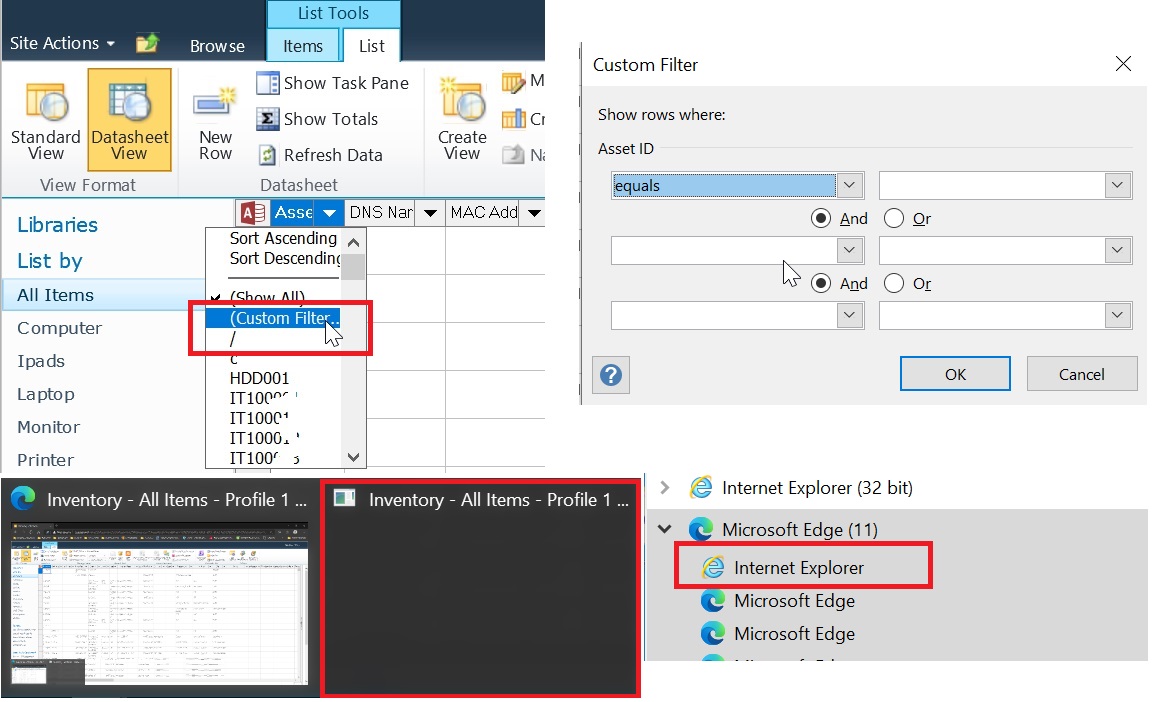
When using IE Mode with a SharePoint 2010 "Access Web Datasheet" the "Custom Filter" feature that launches a filter pop up has stopped working in IE Mode on the newer builds of edge.
Everything is still working when using Edge 81.416.77
When testing in versions 84 onwards it causes edge to crash.
The site loads correctly in IE Mode, when Custom Filter" is clicked, Edge loads an instance of IE in task manager as expected but then everything is hung. The only way to recover is to close this IE instance.
Did something change regarding SharePoint or webparts in around version 81 of Edge?
I have tried forcing different compatibility modes, but nothing helps.
Please see screenshots.
<site url="sharepointsite">
    <compat-mode>Default</compat-mode>
    <open-in>IE11</open-in>
  </site>
3 Replies
 TBU2020Copper Contributor
Not a solution, but it appears that a Windows 10 Update caused it. Maybe the removal of ActiveX in one of the updates from last year.
 jddanCopper Contributor
We've been cursed with the same problem for the last year and I resolved today by setting the site to run in Protected Mode.
Our Sharepoint was in the Local Intranet zone, so in Internet Options > Security > Local Intranet, check "Enabled Protected Mode". If yours is in Trusted Zone, check it in Trusted zone tab.
If you guys still have the issue, there is something for you to try.
Note: I believe it is related to Windows version. I was testing with 2021H1 without issue but upgrading to 2021H2 and later broke the Custom filter in IE mode, at least if it's not running in protected mode.