Forum Discussion

Keith Davis
Nov 12, 2019Steel Contributor
Windows Integrated Authentication - Dialog box prompt for credentials is the wrong one!
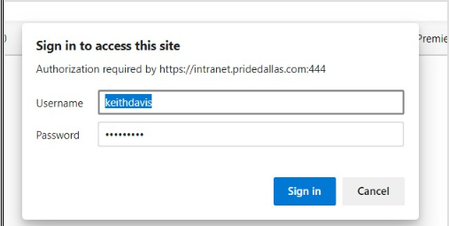
One of the reasons why I decided to move my company to the new Edge instead of Chrome is how Chrome handles WIA for non-domain computers. The issue here is that in all versions prior to 80.0.331...
- Dec 16, 2019
Good news Keith Davis, this is due to "Allow Windows Credentials for HTTP Authentication Challenges" and if you disable it in Edge settings, it will revert to the previous login dialog.
So go to: edge://flags/#edge-windows-credentials-for-http-auth, and set it to Disabled.

Jussi Palo
Sep 15, 2021Iron Contributor
You will need to use the very cumbersome way of setting it in the Group Policies, the do work. Although they are reset every time new Windows 10 (now 11) build install, so I have given up on this on my local machine.

Keith Davis
Sep 15, 2021Steel Contributor
Jussi Palo I've yet to ever see a setting in GP that addresses this, can you point me to it?
- Jussi PaloSep 28, 2021Iron Contributor
Apologies Keith Davis, didn't have notifications enabled here so didn't notice your question until now. Wrote a blog article of this, as I kept forgetting how to do it: https://blog.jussipalo.com/2021/09/edge-reverting-to-classic.html
Let me know if it works for you!- Keith DavisSep 29, 2021Steel Contributor
Jussi Palo The GP setting worked. However, LastPass still can't fill it - maybe something wrong with LP, but that used to work. The built-in password mechanism in Edge worked though.