Forum Discussion

UX for sleeping tabs
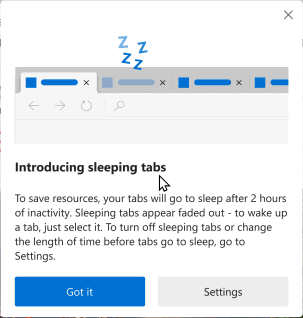

user is Not constantly bombarded by that prompt.
if you are using an older Edge version and get a new update that comes with sleeping tabs, you get that notification explaining to you what it means when a tab is gray, that's it, you click got it and you won't see it again.
Sleeping tabs is not broken, it's fully functional and does Not need any special attention from user whatsoever.
sleeping tabs automatically wake up when user clicks on them.
it is also smart enough not to put certain tabs to sleep to prevent from breaking their functionalities.
you can get more info about them here: edge://discards/
 cosmoticMar 04, 2021Copper Contributor
There are a *lot* of one-time dialogs that happen practically all at once when a user starts using Edge. I was victim to this just yesterday on my mac where Edge showed a full-screen-but-not-Proper-full-screen window covering up my whole screen with a gradient and there was no obvious way to close it. This sort of thing is simply unacceptable.
My expectation after installing a web browser is opening the thing and typing a URL in and seeing that page. No requests to import bookmarks, no requests to attach accounts, no tutorials or introductions pr pleadings or love letters from the developers, no alerts about (broken) features like sleeping tabs, etc.
I very much want not to have a modal explain what a gray tab is. I want a tooltip with similar text as the one I screenshotted but WITHOUT an animation or color (unless its turning the "this tab is sleeping" text gray).
I say its a broken feature because it apparently required a modal tutorial (a UX anti-pattern) to explain what it is. The user story is likely "I want background tabs to use less resources", that can be implemented numerous ways. The way the edge team decided to implement it appears to cause user confusion when they no longer receive notifications on tabs they thought they would receive notifications. The edge team, thankfully, realized this shortcoming but solved it improperly. Modal dialog boxes with long-winded technical and in-the-end often misunderstood descriptions do NOT solve the problem.
Discards sounds like a edge-authors white list of web pages edge would have otherwise broken. A better solution is to not break those pages.
- HotCakeXMar 04, 2021MVPall popular browsers, if not all of them, ask for account login and show you welcome screens.
if that prompt was shown to you more than once, like 3 times etc. you can submit a feedback using feedback button on Edge, because that's not how it's supposed to be.
there is no problem with that prompt, just a regular small thing to let the user know about the gray tabs, that's it.
which website's notification is suppressed as a result of that tab going to sleep?
discards sound like what?- cosmoticMar 04, 2021Copper ContributorEdge can (and should) "be the better person" and not show the welcome screen. Don't follow the lemmings off the cliff.
Any unnecessary prompt shown more than zero times is a bug IMHO.
As a user and UX professional, I am here announcing that I consider that prompt a problem. No matter how small you think it is or how important you think it is to explain to users that one feature (out of thousands), I believe the cost to be higher than the benefit.
If the sleeping tabs had no negative side effect (missing notifications in something like facebook or linked in), there would be no reason for the dialog explaining them, except maybe to brag about the feature at the users expense. I presume the implementation is such that it just freezes all JS running on the page, suspending the timeouts and intervals until the tab is focused again. If so, maybe letting them run once a minute or something would be a nice compromise?
The discards I was referring to was the about:discards feature hinted at edge://discards/