Forum Discussion

relu84
Dec 30, 2019Iron Contributor
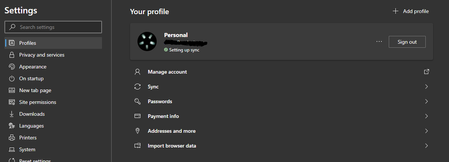
Sync stuck at "setting up sync"
I'm using Edge canary and since I reinstalled Windows I cannot get sync to work at all. Fresh after installing Windows I installed Edge and logged into my account. I had a "Setting up sync..." messag...

Anonymous
Jan 06, 2020relu84 Great, we're glad to hear it! Good news: there are two ways to obtain a log file. The first is to submit feedback through the browser, which will generate a log.
The second is more hands-on but can be done anytime. Go to edge://sync-internals/ and click the "Data" tab in the top right, then select "Dump sync events to text." (Please be advised that the resulting file will likely include personal information.)
Hopefully that helps!
Fawkes (they/them)
Project & Community Manager - Microsoft Edge

relu84
Jan 08, 2020Iron Contributor
I just built my new desktop PC yesterday, I didn't have time to test anything yet, but I did install Edge beta and logged into my MS account. What I've noticed is sync got stuck at "Setting up sync". I am at work now, so can't post any details from sync internals, but I will submit feedback later today and maybe post a screenshot in this thread. I can't recall exactly, but the log-like box on the right seemed to say something in the vein of "could not connect to the network".
Of course, I tried uninstalling (and using the option to clear any data that could be left over) and reinstalling (twice ;)) and it did not help.
Sorry for this post being a bit pointless without any specific details 😉
Of course, I tried uninstalling (and using the option to clear any data that could be left over) and reinstalling (twice ;)) and it did not help.
Sorry for this post being a bit pointless without any specific details 😉