Forum Discussion

SQL Server Reporting Services Edit in Report Builder not working in new Edge browser
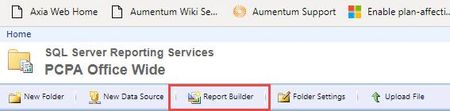

andre_krmpl Yes viewing reports worked without issue. Prior to installing the extension, Report Builder did not work. A couple of differences, I'm using the Edge Dev build and we are using SSRS 2014.

I tried the Click Once helper Chrome Extension and the dev-edition of the new edge.
Unfortunately none of these made the reports show up.
Seems to be an issue with SSRS 2012 or how we set it up..
- andre_krmplJun 23, 2019Copper Contributor
A quick update on that topic:
I've just tried it with the latest dev build 77.0.189.3 and everything seems to work fine.
 Le_MichelNov 18, 2019Brass Contributor
Same issue with Edge 79.0.309.18
Is the Click Once helper Chrome Extension still needed ?
PLATFORM VERSION INFO
Windows : 10.0.17763.0 (Win32NT)
Common Language Runtime : 4.0.30319.42000
System.Deployment.dll : 4.8.3761.0 built by: NET48REL1
clr.dll : 4.8.4042.0 built by: NET48REL1LAST_C
dfdll.dll : 4.8.3761.0 built by: NET48REL1
dfshim.dll : 10.0.17763.1 (WinBuild.160101.0800)SOURCES
Deployment url : file:///C:/Users/<user>/Downloads/ReportBuilder_3_0_0_0%20(7).applicationIDENTITIES
Deployment Identity : ReportBuilder_3_0_0_0.application, Version=12.0.6024.0, Culture=neutral, PublicKeyToken=a8eee8aa09b0c4a7, processorArchitecture=x86APPLICATION SUMMARY
* Online only application.
* Trust url parameter is set.
ERROR SUMMARY
Below is a summary of the errors, details of these errors are listed later in the log.
* Activation of C:\Users\<user>\Downloads\ReportBuilder_3_0_0_0 (7).application resulted in exception. Following failure messages were detected:
+ Downloading file:///C:/Users/<user>/Downloads/RptBuilder_3/MSReportBuilder.exe.manifest did not succeed.
+ Could not find a part of the path 'C:\Users\<user>\Downloads\RptBuilder_3\MSReportBuilder.exe.manifest'.
+ Could not find a part of the path 'C:\Users\<user>\Downloads\RptBuilder_3\MSReportBuilder.exe.manifest'.
+ Could not find a part of the path 'C:\Users\<user>\Downloads\RptBuilder_3\MSReportBuilder.exe.manifest'.COMPONENT STORE TRANSACTION FAILURE SUMMARY
No transaction error was detected.WARNINGS
There were no warnings during this operation.OPERATION PROGRESS STATUS
* [18/11/2019 09:49:10] : Activation of C:\Users\<user>\Downloads\ReportBuilder_3_0_0_0 (7).application has started.
* [18/11/2019 09:49:10] : Processing of deployment manifest has successfully completed.
* [18/11/2019 09:49:10] : Installation of the application has started.- Anna_WNov 18, 2019Copper Contributor
It is still needed to edit a report in Report Builder for Reporting Services 2014. I tested again this morning on Microsoft Edge Dev Version 80.0.328.4 (Official build) dev (64-bit).