Forum Discussion

Some bugs and suggestions with the latest versions (Canary)
- Apr 14, 2020
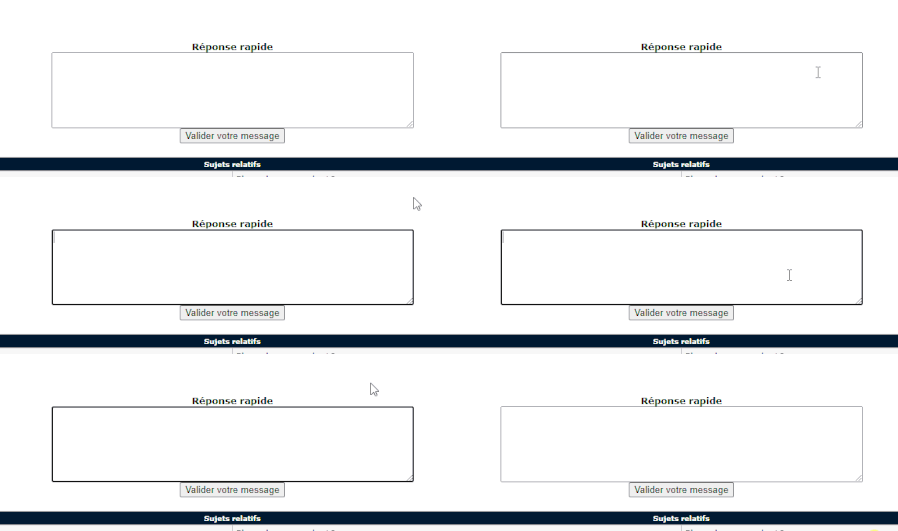
With regards to the black bar on focusable elements this change is by design and was tested with end users. From an aesthetics perspective the change was roughly a 50/50 split for/against but it was more preferred by users that have a need for higher contrast colors. Because of our focus on accessibility we decided that it broke the tie. We go over this change in our blog post about the updated form controls. This change has landed in Chromium itself and will be visible in Chrome started in version 83.
And Firefox is also considering aligning with our adjustment too due to the accessibility benefits.
Thanks as always for the feedback and please keep it coming.


No change with the last Canary (.378)
We will end the year with these "same problems" 
Hi
Happy New Year to you all 🙂
I re tested with Chrome, no problem with 3 and 4
For 2, the setting is present in Chrome, and is disabled by default
Thanks
- HotCakeXJan 07, 2020MVPWhen did you test it?
- tistouJan 07, 2020Bronze Contributor
I had done my tests on a clean installation of Windows and installing Edge Canary and another clean installation of Windows with Edge Beta, to be sure 😉
After this problem is less annoying than the black border that appears on text frames, clickable links, etc... (problem 4)
- HotCakeXJan 07, 2020MVPYou better fully uninstall your Edge canary and Dev if you have it too.
then during uninstall, check to remove all user data.
after that go to Edge's install directory and manually search for any leftovers, 3rd party programs can do this too.
I would clean install my OS too just to be sure (either using ISO file or from the Windows settings), the leftovers of previous Edge installs/uninstalls must be on other places too.
once you've done that, don't make any customizations to the OS or Edge, except for setting that website to load on start up.
you can try doing this in a Hyper-V virtual machine too. - HotCakeXJan 07, 2020MVPSpoiler
tistou wrote:My start page is www.free.fr
and about: blank appears for any web page
Even if I put the link of this forum for the start page, I have about:blank firstNo problem if I put "new tab" for the start page, there is no url
I tried it and couldn't reproduce it. Edge canary opens the page normally, no about:blank
this can't be a bug that is only happening to you because that wouldn't be a bug at all.
for these reasons:
1. If this was a Bug that was caused by controlled feature roll outs, which is the only factor that differentiates our browsers, it should have got fixed by itself by now.
look at the date, posted 11/22. it's 1/7 now. whatever experiment that was going on at that point in time is finished now.2. there are most likely lots of people that set a custom page to open on startup instead of the NTP. it's a common thing. but there hasn't been any reports in the forum about this issue. can't be that everyone else is clumsy and you're the only one who pays attention 🙂
I also tried setting my Edge language to French, in case it was only happening to that locale, and using VPN to get French IP address, but still nothing, it was working normally.
What's the version of your Windows 10?
- tistouJan 07, 2020Bronze Contributor
My start page is www.free.fr
and about: blank appears for any web page
Even if I put the link of this forum for the start page, I have about:blank firstNo problem if I put "new tab" for the start page, there is no url
- HotCakeXJan 07, 2020MVPOkay so when you open your Edge browser, instead of seeing the NTP, you see about:blank?
set the startup to open a new tab in here: edge://settings/onStartup - tistouJan 07, 2020Bronze Contributor
Yes, sorry for my englsih
The problem for the about:blank
If I open a web page, I first have a "about: blank" web page before having the requested page (start page, shortcut page, clickable link from software, etc...)
If the browser is already open, and I open a web page from a shortcut, clickable link from software, etc... I have the requested page directly in new tab (no about:blank)
I suppose that when Edge opens (version from 80.x), it opens by default on a blank page (about:blank) before opening the requested web page
- HotCakeXJan 07, 2020MVPIt's unclear because:
1. what is the problem exactly?
2. how to reproduce it? how to make it happen?
you're saying there is a problem but you don't say what..
you only wrote this:
"Since several versions of Canary, with each opening of the browser, it is first the about: blank url before having the right url (it slows down navigation)
The problem does not appear if Edge is already open (and the new page opens in a new tab"
each opening of the browser, it is the first about:blank page before having the right URL. at least try to reword that - tistouJan 07, 2020Bronze Contributor
It would suffice, I think, to compare version 79.0.309.54 with current versions (changes made)
This is what I do when I debug a problem on a new version of software that I testIt is like the problem of the black framing on the text zones, this problem seems impacted that the French users (Windows French), I saw some people having the same problem on French forums
- HotCakeXJan 07, 2020MVP
tistou wrote:I don't know, all I know is that I don't have this problem with beta 79.0.309.54 and the other chromium (so it's a bug)
No doubt people don't pay attentionBeing beta tester for some "apps", I probably pay more attention to this kind of problem
Then how can you expect it to get fixed without a clear instruction on how to reproduce it?
I don't know about people but I think I pay enough attention, yet I can't even know what that problem even is because the explanation at top sounds vague.
- HotCakeXJan 07, 2020MVPBut what is a clear instruction to reproduce the #3?
It's been there for months, I haven't seen anyone else reporting the same problem. - HotCakeXJan 07, 2020MVPYou got the answer here:
https://techcommunity.microsoft.com/t5/discussions/install-apps-option/m-p/1093474/highlight/true#M20642 - HotCakeXJan 01, 2020MVP
tistou wrote:Yes, not a bug but a suggestion
We wish we could turn it off, have a choice, in fact (like with other Chromium browsers)
Oh okay, Good thing that it's no longer called a bug 😉
so you wish you could turn it off,
I personally like to see it more often, in fact i even suggested before to make it a fixed button so we can turn any page we want into immersive reader move instead of Edge deciding that on its own, which is not very good at it. - HotCakeXJan 01, 2020MVP2 is not a problem, it's a feature and of course Google doesn't seem to have the same interest into providing a reliable reading view mode like Microsoft does.
there are many chromium based browsers like Opera, Vivaldi, Brave etc, each having their own distinct features, you call them "problems" too just because you can't turn them off?
