Forum Discussion

Sites loading unreliable
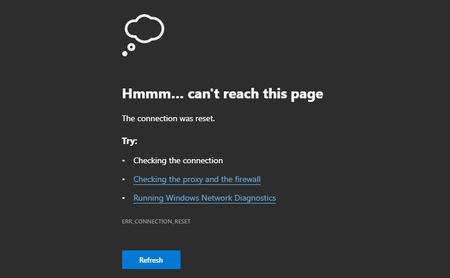

HotCakeX All extensions off, still happening, but (forgot to mention earlier) it only happens when connected to the school wifi.

cjc2112 wrote:HotCakeX All extensions off, still happening, but (forgot to mention earlier) it only happens when connected to the school wifi.
Well there you have it, you already know the answer 😉
Use a VPN (could be even an extension) or proxy (lots of free ones)
UWP Edge (Classic Edge) does not use proxy configurations so whatever your school is using to block connections, it might not be applying to the Edge classic.
Firefox supports its own proxy settings and can easily ignore system proxy configurations
- cjc2112Dec 19, 2019Bronze Contributor
HotCakeX Then how come chrome also loads the sites with no problem? How come edge is the only browser to have problems?
- HotCakeXDec 19, 2019MVP
cjc2112 wrote:HotCakeX Then how come chrome also loads the sites with no problem? How come edge is the only browser to have problems?
Good questions..
Try this, go to edge://net-internals/#sockets
go to proxy, DNS, SOCKETS, one by one and clear/delete all caches and restart browser. if it won't fix it then it may be just a bug with Edge
you could try netsh int ip reset on powershell/CMD with admin rights too but don't think you can do it on school computers
you could also check if they are controlling your Edge: edge://management/
 braddnDec 19, 2019Copper Contributor
HotCakeX The LogMeIn error doesn't occur until we are in the LogMeIn Central Console and you try to remote on to another computer. When I inspect the source it looks to me like when the iFrame is called for the remote session it then errors out.
I can get to the LMI homepage, login, see the list of computers in our account. We just can't remote on to them. The other site having issues is the Dell SonicWall firewall admin web site. That is definitely an iFrame issue.
- Eric_LawrenceJan 07, 2020
Microsoft
braddn HotCakeX -- The issue with LogMeIn and MicroCenter.com is a known problem, a bug for which is filed upstream: https://bugs.chromium.org/p/chromium/issues/detail?id=1028602. You can workaround the issue by closing all instances and restarting the browser:
Start > Run (or Win+R)
msedge.exe --disable-features=PostQuantumCECPQ2 www.microcenter.com
I would be very interested to learn whether this workaround also fixes the "Dell SonicWall firewall admin website" (which I assume is not on a public URL).
(As to "why Edge fails and Chrome doesn't?"-- Chrome Beta and Dev and Canary will fail. Chrome Stable does not yet have the change that the site cannot handle.)cjc2112 : I would also be interested in learning whether this workaround has any impact on your scenarios. If so, it's likely that your network administrator is using some sort of HTTPS filtering software that is failing to handle the larger handshake sent by the PostQuantum experiment.
- cjc2112Jan 16, 2020Bronze Contributor
Eric_Lawrence It might. I'm not sure what you mean by scenarios, though. This problem has also migrated to beta and is starting to affect the login for Microsoft page. I did stumble on this flag and was wondering if this had anything to do with it, since braddn mentioned that it might be an iFrame issue:
- HotCakeXDec 19, 2019MVP
Please use this method to send Microsoft a rich feedback and error report
sign out of Logmein or clear cookies, close all tabs, start recording and recreate the problem, let it recording everything and then press stop.
now write the complete description of the problem but Don't hit the send just yet.
close the tab again,
go to this page: edge://net-export/
press "Start Logging to Disk"
then press "Start Logging to Disk"
follow the instructions and then do the same thing you did again, recreate the problem and let it record all the network issues that happens. attach that file to your feedback
and now hit send

