Forum Discussion

Share Button added to the Toolbar!
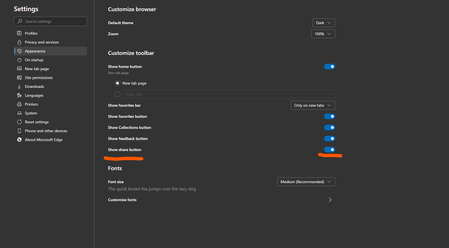

I see. However, I cannot recall any software product that I've used/seen that, when offering the option to add items to a toolbar, those same items are removed from a menu; and visa-versa. That is, toggling an item to appear on a menu or toolbar, but not on both at the same time.
I imagine there might be products somewhere that may do this, but have you ever seen this functionality in any Microsoft product?
I believe such functionality would be potentially confusing to some users... "Where did that menu item go? It's there on my other computer!"... and potentially create an inconsistency in the user interface as users move from one device to another.
So perhaps we'll have to agree to disagree. 

Graymatter wrote:I see. However, I cannot recall any software product that I've used/seen that, when offering the option to add items to a toolbar, those same items are removed from a menu; and visa-versa. That is, toggling an item to appear on a menu or toolbar, but not on both at the same time.
I imagine there might be products somewhere that may do this, but have you ever seen this functionality in any Microsoft product?
I believe such functionality would be potentially confusing to some users... "Where did that menu item go? It's there on my other computer!"... and potentially create an inconsistency in the user interface as users move from one device to another.
So perhaps we'll have to agree to disagree.
If you want to talk about history then that's not a good idea. because who would have thought Microsoft let go their EdgeHTML engine and use Google's Chromium in their browser.
who would have thought Microsoft contribute to open source community, bring their products to the Linux.
https://github.com/MicrosoftEdge/MSEdge#microsoft-edge--open-source-a-new-direction-for-microsoft
life is full of surprises, don't worry about what was before, think about what is possible and can happen now and in the future.
about inconsistency, there won't be any and it won't cause confusion for the user. these settings should be synced under "Settings sync" in here: edge://settings/profiles/sync
the experience will be the same across users' devices.
I've seen a lot of products and UIs, I don't remember all of them at the moment but a responsive UI is definitely nothing new, specially in 2020.
- HotCakeXFeb 21, 2020MVPThe downloads and history buttons should make their way up to the toolbar too in the future and eventually put all the buttons under 1 hub like in classic Edge or something like that 🙂
- Graham-STMCFeb 21, 2020Steel Contributor
HotCakeX I saw it there too. Well done. So pleased this button has moved back to it's correct home - at least during the change-over period between old and new Edge. I agree it would be great to have options to move things around at a later stage.
My only remaining concern before the switchover arrives via Windows Update is the really odd way that 'Chrome' Edge manages downloads compared with the lovely buttons and features of classic Edge - but will continue comment on that discussion separately!
- HotCakeXFeb 21, 2020MVPOh nice 🙂
- Jacques Van de MeersscheFeb 21, 2020Steel Contributor
Congrats HotCakeX you have been quoted on MSPowerUser https://mspoweruser.com/edge-canary-users-rejoice-over-the-addition-of-the-share-button-to-the-toolbar/.

