Forum Discussion

chall3ng3r
Feb 13, 2020Copper Contributor
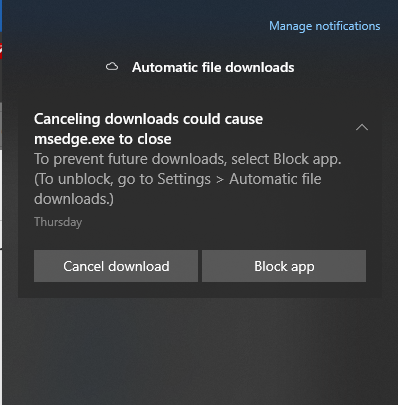
Edge won't stop downloading from OneDrive
On some website, I tried to upload a photo saved in subfolder of Pictures of OneDrive, which was set to online only. Through the Open / Select file dialog of Edge browser, I navigated to the folder, ...

HotCakeX
Feb 13, 2020MVP
Simply choose "block app", that's the workaround
https://www.ghacks.net/2017/05/18/you-should-disable-automatic-downloads-in-chrome-right-now/
https://www.ghacks.net/2017/05/18/you-should-disable-automatic-downloads-in-chrome-right-now/

chall3ng3r
Feb 13, 2020Copper Contributor
Thanks, that's interesting link. This issue is separate I think, as mine is related to Edge keeping a lock on file saved on OneDrive, and trying to download it even when I don't want to.
I managed to make it stop, I guess. I tried to open another site, chose to upload a file, and navigated to C:\Temp where a random photo was saved. Uploaded it. So far, that popup haven't come back.
I managed to make it stop, I guess. I tried to open another site, chose to upload a file, and navigated to C:\Temp where a random photo was saved. Uploaded it. So far, that popup haven't come back.
- HotCakeXFeb 13, 2020MVPWell that's good,
Idk why Edge would need to be closed for OneDrive to stop downloading, that's weird- chall3ng3rFeb 14, 2020Copper ContributorI think Edge is keeping file open, which it shouldn't. OneDrive thinks Edge needs it, so starts background download.
- HotCakeXFeb 14, 2020MVPThat scenario is totally possible yeah