Forum Discussion

An error occurred. (Error code: 9) (Extra code: 0)
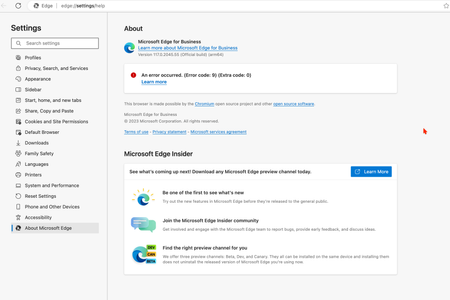
 Oct 17, 2023
CyrilYu run these commands would resolve the problem
sudo rm -rfv /Library/LaunchDaemons/com.microsoft.EdgeUpdater.*
sudo "/Applications/Microsoft Edge.app/Contents/Frameworks/Microsoft Edge Framework.framework/Versions/118.0.2088.46/Helpers/EdgeUpdater.app/Contents/MacOS/EdgeUpdater" --install --system --v=2
then restart edge browser, open `edge://settings/help`, problem should resolved
(found solution after extract MicrosoftEdge-118.0.2088.46.pkg and read scripts/postinstall)

While it may appear straightforward, I followed these steps, but unfortunately, they did not resolve the issue. Let me outline the actions I took:
1 used AppCleaner to completely uninstall Microsoft Edge.
2 then downloaded Microsoft Edge directly from the official Microsoft website.
3 manually checked the LaunchDaemons folder to ensure there were no remaining Edge files.
Finally, I executed the installation process for the Edge browser.
I want to emphasise that I confirmed the absence of the mentioned file in the folder and executed the second command as suggested."
Here is after running the commandStill getting the error
Feejus unnecessary to uninstall app, just open `Terminal.app`, copy and past my command, and enter password when required.
CyrilYu as previous replies by others, I found it may relate to LaunchDaemons of edge. most app would update the daemon scripts when app launches, but edge seems only do that when app install, so I extracted install package and read scripts. The mostly possible reason of the bug is The EdgeUpdater.app not updated in `/Library/Microsoft/EdgeUpdater` in some reason. no time to research further, edge dev team should do this, not me
- yeliexOct 17, 2023Copper Contributorbesides, the signal of commands run success is it finally print exit code 0, the commands call edge updater to reinstall it self to Mac system
 CyrilYuOct 17, 2023Copper Contributor
Hey everyone, I've discovered an alternative solution to the problem. As I mentioned earlier, the issue stems from the login item. While yeliex's method is certainly effective, I've found another approach.
Instead of simply uninstalling, completely remove Microsoft Edge from your Mac. By "completely", I mean ensuring that no trace of any Microsoft Edge file remains on your system. I utilized the Spotlight search to locate and delete every associated Edge file. Once I completed this, I restarted my Mac, reinstalled Edge, and noticed that the login item it automatically downloaded resolved the issue.
It seems that merely using software like AppCleaner isn't thorough enough. Manually searching for and eliminating any lingering Edge files is essential.
- CyrilYuOct 17, 2023Copper ContributorI'm proud of myself because I was the first to notice that the problem arose in /Library/LaunchDaemons/. I tested with a virtual machine and found that new machines do not have the issue of login items failing to download. So, I believe the problem is that the new Edge installer doesn't recognize if your machine is brand new. Therefore, as long as you truly remove all the issues with Edge and download Edge from the official website, the problem will be easily resolved.
I just successfully tried it on my main machine. I carefully examined all files containing 'edge', meticulously deleted the files truly belonging to the MS Edge browser, and after restarting and installing Edge, all the problems disappeared. It's perfect.