Forum Discussion

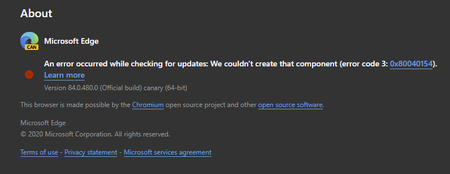
84.0.480.0 (Official build) canary (64-bit) shows error on About screen
- Apr 14, 2020Thanks but it was always an option for everyone at any time, not new to this.
this problem is fixed in the next Canary updates. also the updater works using these methods which is even better than the normal updater since user can set it to check for updates automatically every hour or every minute.
https://techcommunity.microsoft.com/t5/discussions/84-0-480-0-official-build-canary-64-bit-shows-error-on-about/m-p/1304083/highlight/true#M28779
https://techcommunity.microsoft.com/t5/discussions/84-0-480-0-official-build-canary-64-bit-shows-error-on-about/m-p/1303650/highlight/true#M28766


Hi everyone,
Thank you for sharing your experiences with this. One of our program managers had some initial https://twitter.com/OliviaZ73011638/status/1244804479452495872:
"1. Press Win +R, type cmd.exe and press Enter
2. Type “%LOCALAPPDATA%/Microsoft/EdgeUpdate/MicrosoftEdgeUpdate.exe /regserver” and press Enter
3. Reboot the machine and verify if the issue is fixed."
If that doesn't resolve the error, you can also try uninstalling and reinstalling Canary. And to confirm, there are no known performance effects with this error, it just means that you might not see version 84 changes until after we can push the fix in a subsequent build.
Hope this helps, and please let us know if you see anything else come up!
Fawkes (they/them)
Project & Community Manager - Microsoft Edge

Deleted
I was waiting for canary to break a little 😉 ah well! Thanks for the update and look forward to the fix!
- DeletedApr 10, 2020
MichaelC Dennis5mile TheShaunSaw RedBeta HotCakeX Rohit Yadav
Thank you all for the quick testing on this! We are actively in communication with the product team about this right now, and will keep you all updated as they find out more. (It sounds like there may be a secondary bug that's making those troubleshooting steps ineffective.)
We appreciate your help with this!
Fawkes (they/them)
Project & Community Manager - Microsoft Edge- Rohit YadavApr 12, 2020Bronze Contributor
Deleted any update from the team on this issue?
- DeletedApr 13, 2020
Thank you all for your diligence and follow-up on this! We're in communication with the product team and will let you know as soon as we have confirmed what the next steps are, whether that be a fix ETA or potential workarounds.
Fawkes (they/them)
Project & Community Manager - Microsoft Edge
- Dennis5mileApr 11, 2020Silver Contributor
Deleted
Updated to 481, but error still present...
Dennis5mile
- thexfileApr 11, 2020Brass Contributor
I am on Windows 10 build 19603 (fast ring).
 ms4132Apr 10, 2020Steel Contributor
Deleted @Michael Cramer @Dennis5mile @theshaunsaw @RedBeta @HotCakeX @Rohit Yadav
One thing I noticed after attempting this fix was that the message checking for updates is that the checking for updates appeared momentarily before the error message was displayed. Before attempting the fix and after the first attempt, the screen goes straight to the error message without displaying the checking for updates message.


