Forum Discussion

Provide different options for sorting favorites - Discussion
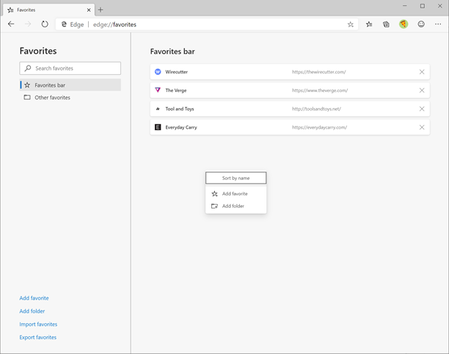

Thanks so much to everyone who provided feedback and thoughts around how to sort their favorites! We’ve recently implemented the ability to sort your favorites alphabetically via the . . . menu in the full page experience for Favorites. To do this, you can either click on the star icon in your toolbar and select Manage favorites, navigate to the . . . menu > Favorites > Manage favorites, or you can hold Ctrl+Shift+O to bring up the page.
Once on the full page experience for your Favorites in builds 83+, you will see a . . . menu at the top right. Click that, and you should see an option for Sort by name.
screenshot of the Favorites page, highlighting where the option to sort is in the menu
We believe that this covers one point of feedback for sorting favorites, however we want to know more. Does this sorting option work for you? Are there other sorting options you’d like to see in Edge? Let us know here or by providing your feedback through the feedback tool that’s built into Edge.

Does not work on my dell win-7-64
I have FOCUSED, INSPIRATIONAL, Informational, custom
From: Microsoft Tech Community <notify@mstechcommunity.microsoft.com>
Sent: Tuesday, April 28, 2020 12:53 PM
To: [Mod Removed - Please do not personal information on these very public forums.]
Subject: Re: Provide different options for sorting favorites - Discussion (Microsoft Tech Community Subscription Update)
Hi RexRocky,
 pneenkoalabearApr 28, 2020Steel Contributoryou're thinking of the top sites (aka quick links) section on the new tab page.