Forum Discussion

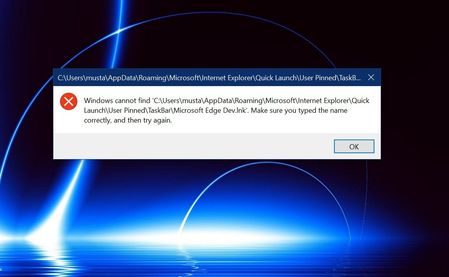
Problem: Edge chromium Dev not opening


Please try the following:
Go to %appdata%\Microsoft\Internet Explorer\Quick Launch\User Pinned\TaskBar\ , create a shortcut with location C:\Program Files (x86)\Microsoft\Edge Dev\Application\msedge.exe and name it Microsoft Edge Dev.
Try starting Edge chromium and please tell if it worked!

 jakkaasJun 17, 2019Copper Contributor
ph_007 wrote:Please try the following:
Go to %appdata%\Microsoft\Internet Explorer\Quick Launch\User Pinned\TaskBar\ , create a shortcut with location C:\Program Files (x86)\Microsoft\Edge Dev\Application\msedge.exe and name it Microsoft Edge Dev.
Try starting Edge chromium and please tell if it worked!
Hello
It is showing the same error.
I have noticed that the following error might be because of pinning the installed chromium edge to the taskbar and I am trying to open the edge by trying to open the shortcut.
Well, I was doing this because when I am clicking the Microsoft edge chromium in the start menu, it is giving no response. I think that chromium edge is not properly installed. I don't know why? Is there an offline installer.- jakkaasJun 17, 2019Copper Contributor
This is what I am getting when I am clicking Microsoft edge chromium from its installed folder