Forum Discussion

Noel Burgess
Apr 16, 2019Steel Contributor
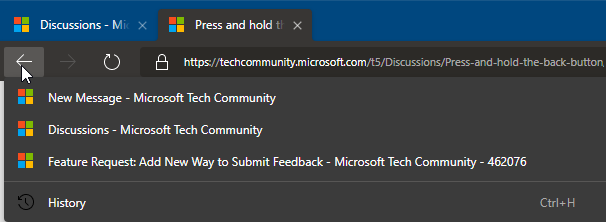
Press and hold the back button
I was delighted to discover that press and hold the back button shows a history of previous pages opened in that tab. This popular feature from IE has been sadly lacking in 'classic' Edge, so I can on...

Dennis5mile
Apr 16, 2019Silver Contributor
Yes as Elliot Kirk ask which are you talking about, because I've always been able to right click the back button to bring down a menu of all the sites I've been on even in "classic edge" ........ without having to hold any buttons..... left click and hold does the exact same as right clicking the back button but with right clicking there is no need to hold.....
Dennis5mile
Dennis5mile

Noel Burgess
Apr 17, 2019Steel Contributor
Dennis5mile wrote:
Yes as Elliot Kirk ask which are you talking about, because I've always been able to right click the back button to bring down a menu of all the sites I've been on even in "classic edge" ...
In both IE and Edge D* I can (left-) click and hold the back button to see previous pages opened in the same tab, then perhaps move down the list and release to open one of them - just one click. That doesn't work in Edge A*, or didn't when I checked again just now.
* An OT suggestion to save typing:
- Edge A = Antebeta, i.e. Classic
- Edge B = Beta
- Edge C = Canary
- Edge D = Dev